Vykar is a fast, encrypted, deduplicated backup tool written in Rust. It’s centered around a simple YAML config format and includes a desktop GUI and webDAV server to browse snapshots. More about design goals.
Do not use for production backups yet, but do test it along other backup tools.
Features
- Storage backends – local filesystem, S3 (any compatible provider), SFTP, dedicated REST server
- Encryption with AES-256-GCM or ChaCha20-Poly1305 (auto-selected) and Argon2id key derivation
- YAML-based configuration with multiple repositories, hooks, and command dumps for monitoring and database backups
- Deduplication via FastCDC content-defined chunking with a memory-optimized engine (tiered dedup index plus local mmap-backed lookup caches)
- Compression with LZ4 or Zstandard
- Built-in WebDAV and desktop GUI to browse and restore snapshots
- REST server with append-only enforcement, quotas, and server-side compaction
- Concurrent multi-client backups – multiple machines back up to the same repository simultaneously; only the brief commit phase is serialized
- Built-in scheduling via
vykar daemon– runs backup cycles on a configurable interval or cron schedule - Resource limits for worker threads, backend connections, and upload/download bandwidth
- Cross-platform – Linux, macOS, and Windows
Benchmarks
Vykar is the fastest tool for both backup and restore, with the lowest CPU cost, while maintaining competitive memory usage.
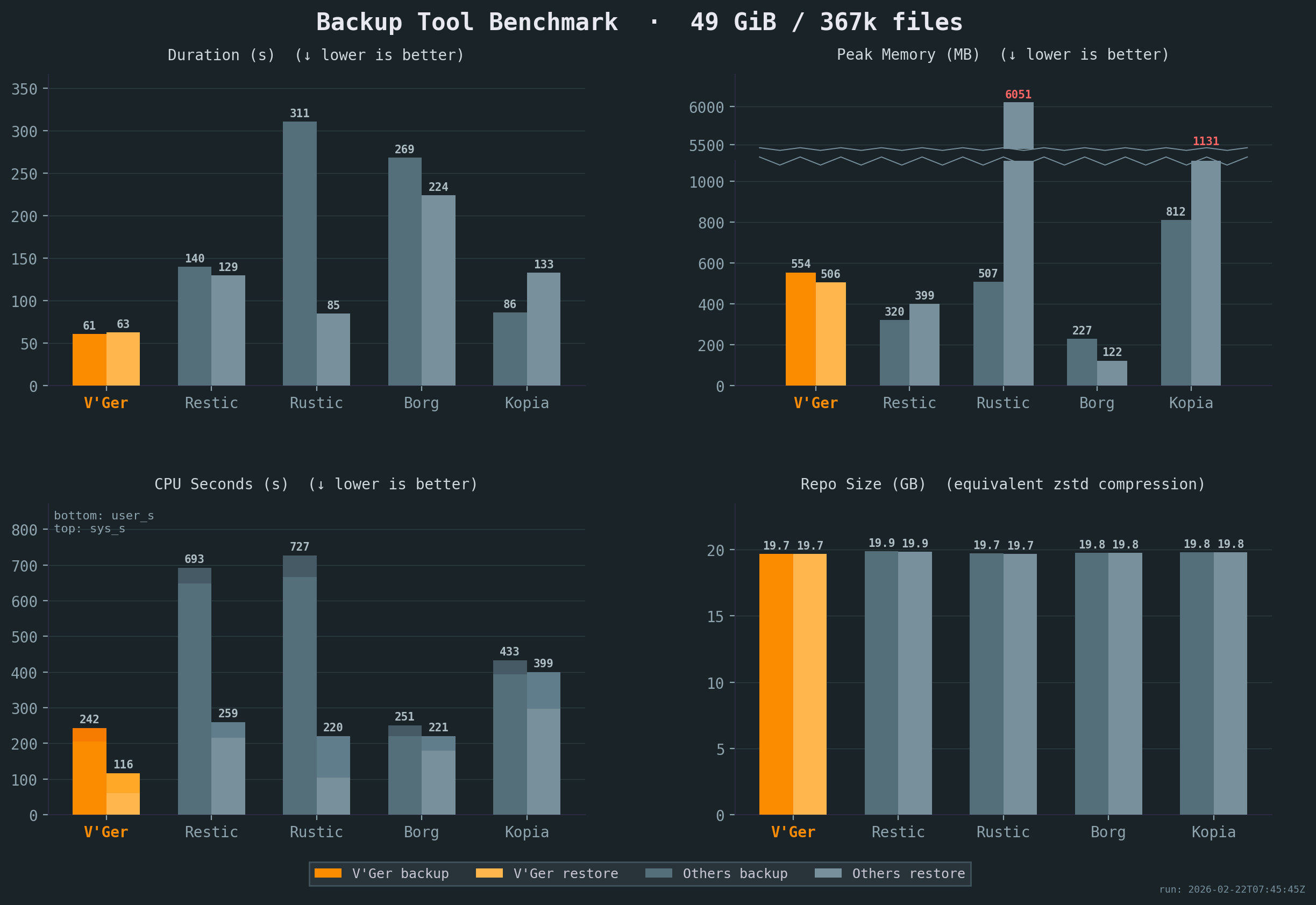
All benchmarks were run 5x on the same idle Intel i7-6700 CPU @ 3.40GHz machine with 2x Samsung PM981 NVMe drives, with results averaged across all runs. Compression settings were chosen to keep resulting repository sizes comparable. The sample corpus is a mix of small and large files with varying compressibility. See detailed results or our benchmark script for full details.
Comparison
Workflow & UX
| Aspect | Borg | Restic | Rustic | Kopia | Vykar |
|---|---|---|---|---|---|
| Configuration | CLI (YAML via Borgmatic) | CLI (YAML via ResticProfile) | TOML config file | JSON config + CLI policies | YAML config with env-var expansion |
| Scheduling | Via Borgmatic | Via ResticProfile | External (cron/systemd) | Built-in (interval, cron) | Built-in (vykar daemon) |
| Storage | borgstore + SSH RPC | Local, S3, SFTP, REST, rclone | Local, S3, SFTP, REST | Local, S3, Azure, GCS, B2, SFTP, WebDAV, Rclone | Local, S3, SFTP, REST + vykar-server |
| Automation | Via Borgmatic (hooks + DB dumps) | Via ResticProfile (hooks only) | Native hooks | Native (before/after actions) | Native hooks + generic command capture |
| Restore UX | FUSE mount + Vorta (third-party) | FUSE mount + Backrest (third-party) | FUSE mount | FUSE mount or WebDAV + built-in UI | Built-in WebDAV + desktop GUI |
| Compression | LZ4, Zstd, Zlib, LZMA, None | Zstd, None | Zstd, None | Gzip, Zstd, S2, LZ4, Deflate, Pgzip | LZ4, Zstd, None |
Repository Operations & Recovery
| Aspect | Borg | Restic | Rustic | Kopia | Vykar |
|---|---|---|---|---|---|
| Concurrent backups | v1: exclusive; v2: shared locks | Shared locks for backup | Lock-free | Concurrent multi-client | Session-based (commit serialized) |
| Repository access | SSH, append-only | rest-server, append-only | Via rustic-server | Built-in server with ACLs | REST server, append-only, quotas |
| Crash recovery | Checkpoints, rollback | Atomic rename | Atomic rename (caveats) | Atomic blobs (caveats) | Journals + two-phase commit |
| Prune / GC safety | Exclusive lock | Exclusive lock | Two-phase delete (23h) | Time-based GC (24h min) | Session-aware lock |
| Data verification | check --repair, full verify | check --read-data, repair | Restic-compat check | Verify + optional ECC | check --verify-data, server offload |
| Unchanged-file reuse | Persistent local filecache (v1 repo-wide; v2 per-series) | Parent snapshot tree | Parent snapshot tree(s) | Previous snapshot manifests/dirs | Per-source local filecache with parent-snapshot fallback |
Security Model
| Aspect | Borg | Restic | Rustic | Kopia | Vykar |
|---|---|---|---|---|---|
| Crypto construction | v1: AES-CTR + HMAC (E&M); v2: AEAD | AES-CTR + Poly1305 (E-t-M) | AES-CTR + Poly1305 (Restic-compat) | AES-GCM / ChaCha20 (AEAD) | AES-GCM / ChaCha20 (AEAD, AAD) |
| Key derivation | v1: PBKDF2; v2: Argon2 | scrypt (fixed params) | scrypt (Restic-compat) | scrypt | Argon2id (tunable) |
| Content addressing | Keyed HMAC-SHA-256 / BLAKE2b | SHA-256 | SHA-256 (Restic-compat) | Keyed hash (BLAKE2B-256-128 default) | Keyed BLAKE3 (repo format v3; keyed BLAKE2b-256 in v2) |
| Key zeroization | Python GC (non-deterministic) | Go GC (non-deterministic) | Rust zeroize | Go GC (non-deterministic) | ZeroizeOnDrop on all key types |
| Implementation safety | Python + C extensions | Go (GC, bounds-checked) | Rust (minimal unsafe) | Go (GC, bounds-checked) | Rust (minimal unsafe) |
Crypto construction: AEAD (Authenticated Encryption with Associated Data) provides confidentiality and integrity in a single pass. Encrypt-and-MAC (E&M) and Encrypt-then-MAC (E-t-M) are older two-step constructions. Domain-separated AAD binds ciphertext to its intended object type and identity, preventing cross-object substitution.
Content addressing: Keyed hashing prevents confirmation-of-file attacks, where an adversary who knows a file’s content computes its expected chunk ID to confirm the file exists in the repository. Unkeyed hashing (plain SHA-256) does not prevent this.
Key zeroization: ZeroizeOnDrop overwrites key material in memory immediately when it goes out of scope. Garbage-collected runtimes (Go, Python) may leave key bytes in memory until the GC reclaims the allocation.
Inspired by
- BorgBackup: architecture, chunking strategy, repository concept, and overall backup pipeline.
- Borgmatic: YAML configuration approach, pipe-based database dumps.
- Rustic: pack file design and architectural references from a mature Rust backup tool.
- Name: From Latin vicarius (“substitute, stand-in”) — because a backup is literally a substitute for lost data.
Get Started
Follow the Quick Start guide to install Vykar, create a config, and run your first backup in under 5 minutes.
Once you’re up and running:
- Configure storage backends – connect S3, SFTP, or the REST server
- Set up hooks and command dumps – run scripts before/after backups, capture database dumps
- Browse and restore snapshots – list, search, and restore files
- Maintain your repository – prune old snapshots, check integrity, compact packs
- Explore backup recipes – common patterns for databases, containers, and filesystems