Home
Vykar is a fast, encrypted, deduplicated backup tool written in Rust. It’s centered around a simple YAML config format and includes a desktop GUI and webDAV server to browse snapshots. More about design goals.
Do not use for production backups yet, but do test it along other backup tools.
Features
- Storage backends – local filesystem, S3 (any compatible provider), SFTP, dedicated REST server
- Encryption with AES-256-GCM or ChaCha20-Poly1305 (auto-selected) and Argon2id key derivation
- YAML-based configuration with multiple repositories, hooks, and command dumps for monitoring and database backups
- Deduplication via FastCDC content-defined chunking with a memory-optimized engine (tiered dedup index plus local mmap-backed lookup caches)
- Compression with LZ4 or Zstandard
- Built-in WebDAV and desktop GUI to browse and restore snapshots
- REST server with append-only enforcement, quotas, and server-side compaction
- Concurrent multi-client backups – multiple machines back up to the same repository simultaneously; only the brief commit phase is serialized
- Built-in scheduling via
vykar daemon– runs backup cycles on a configurable interval or cron schedule - Resource limits for worker threads, backend connections, and upload/download bandwidth
- Cross-platform – Linux, macOS, and Windows
Benchmarks
Vykar is the fastest tool for both backup and restore, with the lowest CPU cost, while maintaining competitive memory usage.
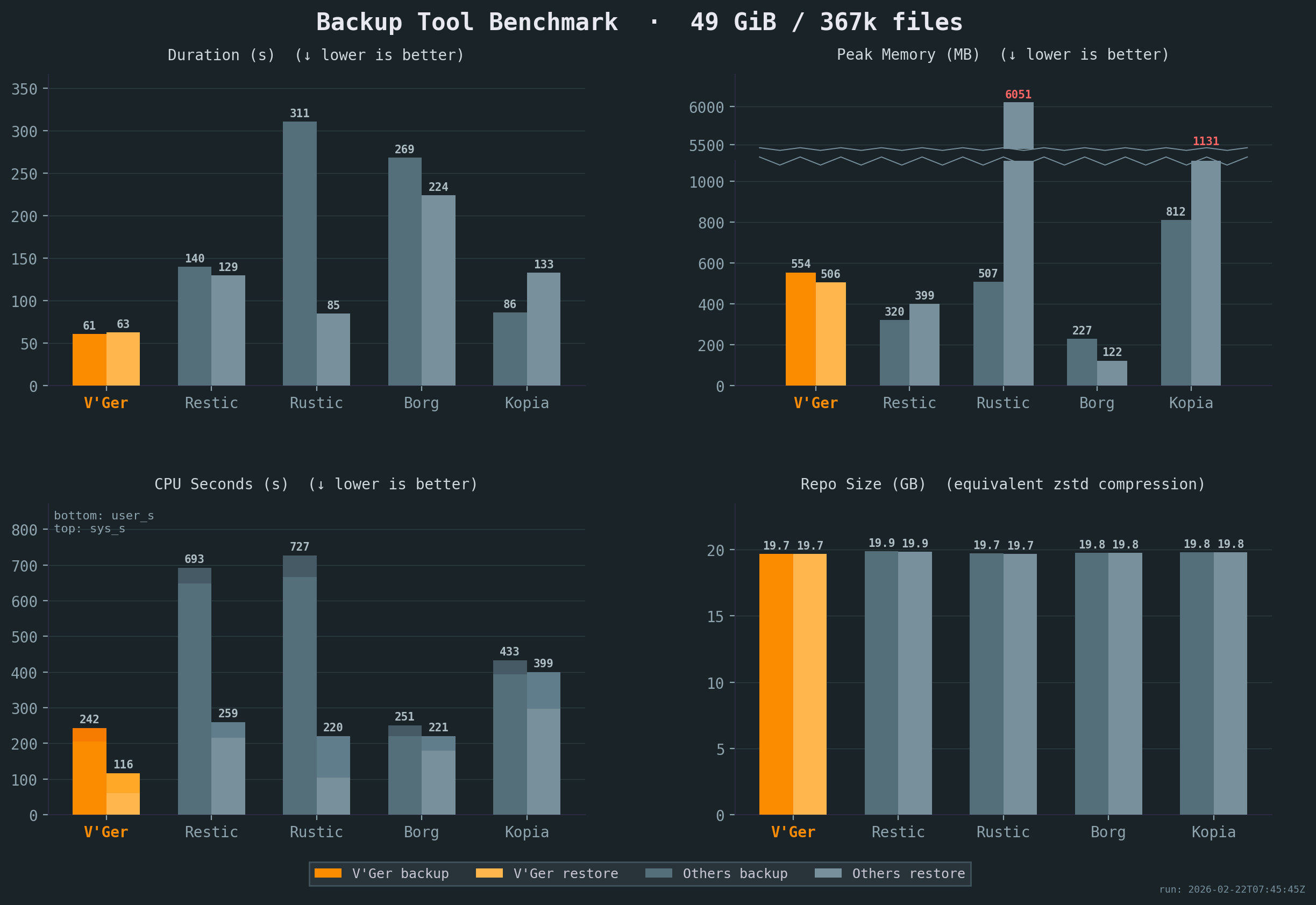
All benchmarks were run 5x on the same idle Intel i7-6700 CPU @ 3.40GHz machine with 2x Samsung PM981 NVMe drives, with results averaged across all runs. Compression settings were chosen to keep resulting repository sizes comparable. The sample corpus is a mix of small and large files with varying compressibility. See detailed results or our benchmark script for full details.
Comparison
Workflow & UX
| Aspect | Borg | Restic | Rustic | Kopia | Vykar |
|---|---|---|---|---|---|
| Configuration | CLI (YAML via Borgmatic) | CLI (YAML via ResticProfile) | TOML config file | JSON config + CLI policies | YAML config with env-var expansion |
| Scheduling | Via Borgmatic | Via ResticProfile | External (cron/systemd) | Built-in (interval, cron) | Built-in (vykar daemon) |
| Storage | borgstore + SSH RPC | Local, S3, SFTP, REST, rclone | Local, S3, SFTP, REST | Local, S3, Azure, GCS, B2, SFTP, WebDAV, Rclone | Local, S3, SFTP, REST + vykar-server |
| Automation | Via Borgmatic (hooks + DB dumps) | Via ResticProfile (hooks only) | Native hooks | Native (before/after actions) | Native hooks + generic command capture |
| Restore UX | FUSE mount + Vorta (third-party) | FUSE mount + Backrest (third-party) | FUSE mount | FUSE mount or WebDAV + built-in UI | Built-in WebDAV + desktop GUI |
| Compression | LZ4, Zstd, Zlib, LZMA, None | Zstd, None | Zstd, None | Gzip, Zstd, S2, LZ4, Deflate, Pgzip | LZ4, Zstd, None |
Repository Operations & Recovery
| Aspect | Borg | Restic | Rustic | Kopia | Vykar |
|---|---|---|---|---|---|
| Concurrent backups | v1: exclusive; v2: shared locks | Shared locks for backup | Lock-free | Concurrent multi-client | Session-based (commit serialized) |
| Repository access | SSH, append-only | rest-server, append-only | Via rustic-server | Built-in server with ACLs | REST server, append-only, quotas |
| Crash recovery | Checkpoints, rollback | Atomic rename | Atomic rename (caveats) | Atomic blobs (caveats) | Journals + two-phase commit |
| Prune / GC safety | Exclusive lock | Exclusive lock | Two-phase delete (23h) | Time-based GC (24h min) | Session-aware lock |
| Data verification | check --repair, full verify | check --read-data, repair | Restic-compat check | Verify + optional ECC | check --verify-data, server offload |
| Unchanged-file reuse | Persistent local filecache (v1 repo-wide; v2 per-series) | Parent snapshot tree | Parent snapshot tree(s) | Previous snapshot manifests/dirs | Per-source local filecache with parent-snapshot fallback |
Security Model
| Aspect | Borg | Restic | Rustic | Kopia | Vykar |
|---|---|---|---|---|---|
| Crypto construction | v1: AES-CTR + HMAC (E&M); v2: AEAD | AES-CTR + Poly1305 (E-t-M) | AES-CTR + Poly1305 (Restic-compat) | AES-GCM / ChaCha20 (AEAD) | AES-GCM / ChaCha20 (AEAD, AAD) |
| Key derivation | v1: PBKDF2; v2: Argon2 | scrypt (fixed params) | scrypt (Restic-compat) | scrypt | Argon2id (tunable) |
| Content addressing | Keyed HMAC-SHA-256 / BLAKE2b | SHA-256 | SHA-256 (Restic-compat) | Keyed hash (BLAKE2B-256-128 default) | Keyed BLAKE3 (repo format v3; keyed BLAKE2b-256 in v2) |
| Key zeroization | Python GC (non-deterministic) | Go GC (non-deterministic) | Rust zeroize | Go GC (non-deterministic) | ZeroizeOnDrop on all key types |
| Implementation safety | Python + C extensions | Go (GC, bounds-checked) | Rust (minimal unsafe) | Go (GC, bounds-checked) | Rust (minimal unsafe) |
Crypto construction: AEAD (Authenticated Encryption with Associated Data) provides confidentiality and integrity in a single pass. Encrypt-and-MAC (E&M) and Encrypt-then-MAC (E-t-M) are older two-step constructions. Domain-separated AAD binds ciphertext to its intended object type and identity, preventing cross-object substitution.
Content addressing: Keyed hashing prevents confirmation-of-file attacks, where an adversary who knows a file’s content computes its expected chunk ID to confirm the file exists in the repository. Unkeyed hashing (plain SHA-256) does not prevent this.
Key zeroization: ZeroizeOnDrop overwrites key material in memory immediately when it goes out of scope. Garbage-collected runtimes (Go, Python) may leave key bytes in memory until the GC reclaims the allocation.
Inspired by
- BorgBackup: architecture, chunking strategy, repository concept, and overall backup pipeline.
- Borgmatic: YAML configuration approach, pipe-based database dumps.
- Rustic: pack file design and architectural references from a mature Rust backup tool.
- Name: From Latin vicarius (“substitute, stand-in”) — because a backup is literally a substitute for lost data.
Get Started
Follow the Quick Start guide to install Vykar, create a config, and run your first backup in under 5 minutes.
Once you’re up and running:
- Configure storage backends – connect S3, SFTP, or the REST server
- Set up hooks and command dumps – run scripts before/after backups, capture database dumps
- Browse and restore snapshots – list, search, and restore files
- Maintain your repository – prune old snapshots, check integrity, compact packs
- Explore backup recipes – common patterns for databases, containers, and filesystems
Quick Start
Install
Run the install script:
curl -fsSL https://vykar.borgbase.com/install.sh | sh
Or download a pre-built binary from the releases page. A Docker image is also available. See Installing for more details.
Create a config file
Generate a starter config file, then edit it to set your repository path and source directories:
vykar config
Initialize and back up
Initialize the repository (prompts for passphrase if encrypted):
vykar init
Create a backup of all configured sources:
vykar backup
Or back up any folder directly:
vykar backup ~/Documents
Inspect snapshots
List all snapshots:
vykar list
List files inside a snapshot (use the snapshot ID shown by vykar list, or latest):
vykar snapshot list a1b2c3d4
Search for a file across recent snapshots:
vykar snapshot find --name '*.txt' --since 7d
Restore
Restore files from a snapshot to a directory:
vykar restore a1b2c3d4 /tmp/restored
For backup options, snapshot browsing, and maintenance tasks, see the workflow guides.
Installing
Quick install
curl -fsSL https://vykar.borgbase.com/install.sh | sh
Or download the latest release for your platform from the releases page.
Docker
Available as ghcr.io/borgbase/vykar on GitHub Container Registry. An apprise variant (ghcr.io/borgbase/vykar:latest-apprise) is also available with the Apprise CLI pre-installed for hook notifications.
Config file
Create a vykar.yaml for Docker. Source paths must reference /data/... (the container mount point):
repositories:
  - url: s3://my-bucket/backups
    access_key_id: "..."
    secret_access_key: "..."

sources:
  - /data/documents
  - /data/photos

encryption:
  passphrase: "change-me"

retention:
  keep_daily: 7
  keep_weekly: 4

schedule:
  enabled: true
  every: "24h"
  on_startup: true
For a local repository backend, use /repo as the repo path and mount a host directory there.
Run as daemon
docker run -d \
  --name vykar-daemon \
  --hostname my-server \
  -v /path/to/vykar.yaml:/etc/vykar/config.yaml:ro \
  -v /home/user/documents:/data/documents:ro \
  -v /home/user/photos:/data/photos:ro \
  -v vykar-cache:/cache \
  ghcr.io/borgbase/vykar
Run ad-hoc commands
With a new container (uses the entrypoint, no need to repeat vykar):
docker run --rm \
  -v /path/to/vykar.yaml:/etc/vykar/config.yaml:ro \
  -v vykar-cache:/cache \
  ghcr.io/borgbase/vykar list
Or exec into a running daemon container:
docker exec vykar-daemon vykar list
Docker Compose
services:
  vykar:
    image: ghcr.io/borgbase/vykar:latest
    hostname: my-server
    restart: unless-stopped
    environment:
      - VYKAR_PASSPHRASE
      - TZ=UTC
    volumes:
      - ./vykar.yaml:/etc/vykar/config.yaml:ro
      - /home/user/documents:/data/documents:ro
      - vykar-cache:/cache
volumes:
  vykar-cache:
Reloading configuration
Send SIGHUP to the daemon container to reload the config file without restarting:
docker kill --signal=HUP vykar-daemon
With Docker Compose:
docker compose kill -s HUP vykar
The daemon logs whether the reload succeeded or was rejected (invalid config).
Triggering a backup
Send SIGUSR1 to trigger an immediate backup cycle without waiting for the next scheduled run:
docker kill --signal=USR1 vykar-daemon
With Docker Compose:
docker compose kill -s USR1 vykar
Read-only status page
Set VYKAR_HTTP_LISTEN (and VYKAR_HTTP_ALLOW_PUBLIC=1 to bind on 0.0.0.0) and publish port 7575 to expose a read-only status page in the browser. See Daemon → Read-only status page for endpoints and bind-safety rules.
docker run -d \
  --name vykar-daemon \
  -p 7575:7575 \
  -e VYKAR_HTTP_LISTEN=0.0.0.0:7575 \
  -e VYKAR_HTTP_ALLOW_PUBLIC=1 \
  -v /path/to/vykar.yaml:/etc/vykar/config.yaml:ro \
  -v vykar-cache:/cache \
  ghcr.io/borgbase/vykar
Environment variables recognised by the daemon:
| Variable | Equivalent flag | Purpose |
|---|---|---|
VYKAR_HTTP_LISTEN | --http-listen ADDR | Bind a read-only HTTP status page (e.g. 0.0.0.0:7575); unset means disabled |
VYKAR_HTTP_ALLOW_PUBLIC | --http-allow-public | Permit non-loopback bind addresses |
VYKAR_CONFIG | --config PATH | Override config file path |
VYKAR_PASSPHRASE | — | Repository passphrase (skips interactive prompt) |
Notes
- Use
-itwithdocker runfor interactive commands to get progress bar output (e.g.docker run --rm -it ...) - Set
--hostnameto a stable name — Docker assigns random hostnames that appear in snapshot metadata - Mount source directories under
/data/and reference them as/data/...in the config - For encryption, use
VYKAR_PASSPHRASEenv var or Docker secrets viapasscommand: "cat /run/secrets/vykar_passphrase" - Use a named volume for
/cacheto persist the snapshot cache across restarts - The
apprisevariant (ghcr.io/borgbase/vykar:latest-apprise) includes the Apprise CLI for sending notifications to 100+ services from hooks. See Notifications with Apprise. - The image includes
curl,jq, andbashfor use in hooks (e.g. monitoring webhooks, JSON payloads). For additional tools, extend the image:FROM ghcr.io/borgbase/vykar RUN apk add --no-cache sqlite - Available for
linux/amd64andlinux/arm64
Ansible
An official Ansible role is available for automated deployment on Linux servers:
ansible-galaxy role install borgbase.vykar
The vykar_config variable accepts your vykar configuration directly as a YAML dict — since both Ansible and vykar use YAML, the config maps one-to-one:
- hosts: myserver
  roles:
    - role: vykar
      vars:
        vykar_config:
          repositories:
            - url: "/backup/repo"
          encryption:
            passphrase: "mysuperduperpassword"
          sources:
            - "/home"
            - "/etc"
          schedule:
            enabled: true
            every: "24h"
See the borgbase.vykar role for all available variables.
Pre-built binaries
Extract the archive and place the vykar binary somewhere on your PATH:
# Example for Linux/macOS
tar xzf vykar-*.tar.gz
sudo cp vykar /usr/local/bin/
For Windows CLI releases:
Expand-Archive vykar-*.zip -DestinationPath .
Move-Item .\vykar.exe "$env:USERPROFILE\\bin\\vykar.exe"
Add your chosen directory (for example, %USERPROFILE%\bin) to PATH if needed.
Build from source
Requires Rust 1.98 or later.
git clone https://github.com/borgbase/vykar.git
cd vykar
cargo build --release
The binary is at target/release/vykar. Copy it to a directory on your PATH:
cp target/release/vykar /usr/local/bin/
Verify installation
vykar --version
Next steps
Desktop GUI
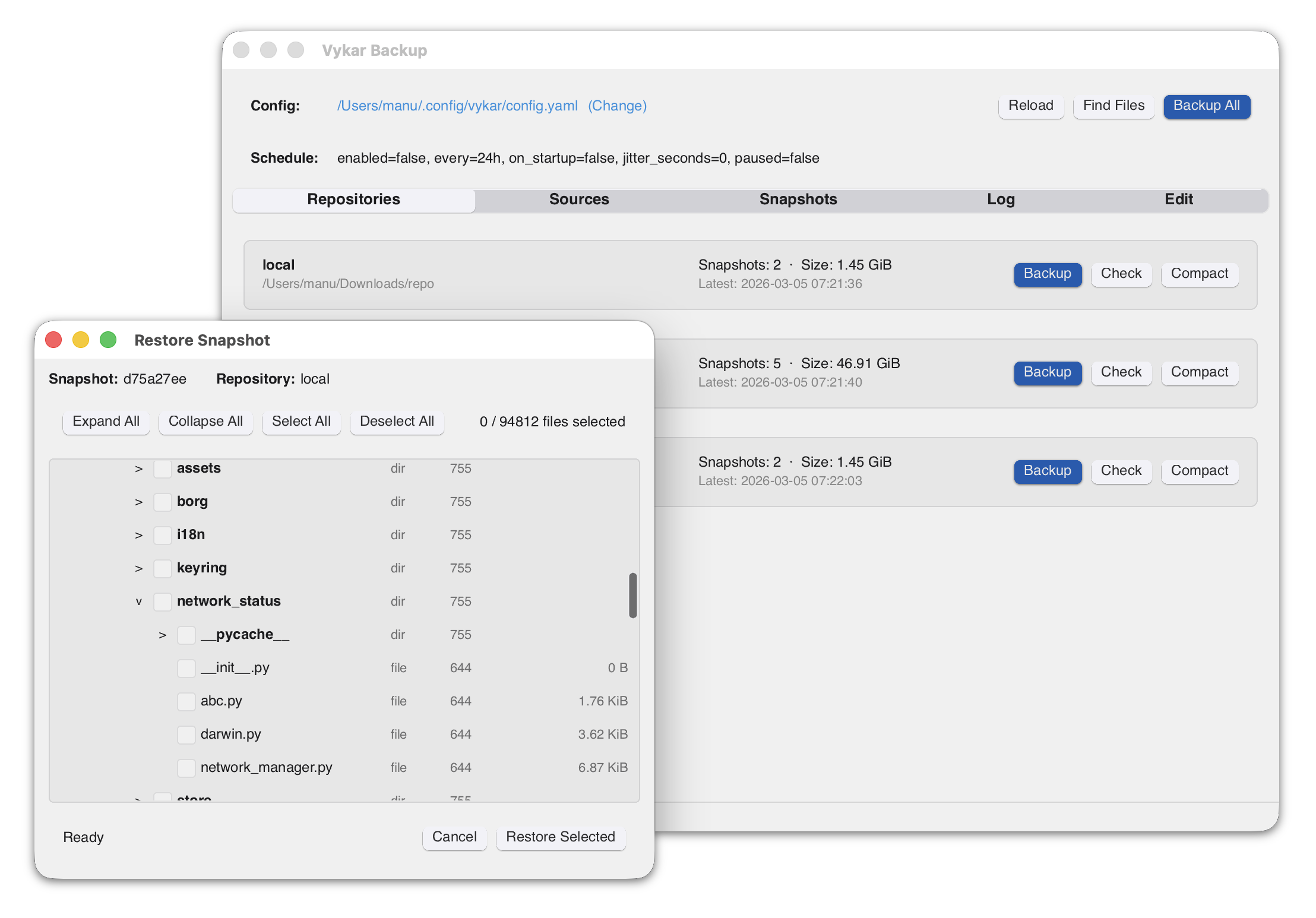
Vykar includes a desktop GUI for managing repositories, running backups, and browsing/restoring snapshots. It is built with Slint.
Installing
macOS
A signed app bundle (Vykar Backup.app) is included in the release archive. Download the latest release from the releases page, extract it, and drag the app to your Applications folder.
Linux
Download the AppImage from the releases page. It bundles most dependencies and runs on x86_64 Linux distributions with glibc 2.39+ (Ubuntu 24.04+, Fedora 40+, Arch, etc.):
chmod +x vykar-gui-*-x86_64.AppImage
./vykar-gui-*-x86_64.AppImage
AppImages require FUSE 2 to run. If you get a FUSE-related error, either install it or use the extract-and-run fallback:
# Install FUSE 2 (Ubuntu 24.04+)
sudo apt install libfuse2t64

# Or run without FUSE
APPIMAGE_EXTRACT_AND_RUN=1 ./vykar-gui-*-x86_64.AppImage
Alternatively, the Intel glibc release archive includes a bare vykar-gui binary. It needs fontconfig, FreeType and xkbcommon at runtime, which desktop distributions already ship.
The tray icon uses the StatusNotifierItem protocol, so the desktop needs a tray host for it. KDE Plasma, Xfce and most other desktops include one; GNOME needs the AppIndicator extension.
To build from source, install the development headers:
sudo apt install libfontconfig1-dev libfreetype-dev libxkbcommon-dev
cargo build --release -p vykar-gui
The binary is at target/release/vykar-gui.
Windows
The GUI is included in the Windows release archive. Download the latest release from the releases page and extract vykar-gui.exe.
Initialize and Set Up a Repository
Generate a configuration file
Create a starter config
vykar config
Or write it to a specific path:
vykar config --dest ~/.config/vykar/config.yaml
Repository format
vykar init always creates a format v3 repository, whose chunk and pack IDs use BLAKE3. There is no flag or config key to choose otherwise. vykar info reports the format and hash of any repository.
Existing format v2 repositories (created by vykar 0.19 and earlier, using BLAKE2b) stay v2 for life and remain fully readable and writable — nothing needs migrating. The hash is part of every chunk’s dedup identity and every pack’s storage key, so it cannot be changed in place.
Two things to know before creating a new repository:
- Older vykar binaries cannot open it (
unsupported repository version: 3). If several machines share one repository, upgrade them together — or keep using the existing repository, which needs no coordination at all. - A self-hosted
vykar-servermust be upgraded first (0.20 or later).initchecks this up front and refuses with a clear message rather than creating a repository whose first backup would fail.
Encryption
Encryption is enabled by default (mode: "auto"). During init, vykar benchmarks AES-256-GCM and ChaCha20-Poly1305, chooses one, and stores that concrete mode in the repository config. No config is needed unless you want to force a mode or disable encryption with mode: "none".
The passphrase is requested interactively at init time. You can also supply it via:
VYKAR_PASSPHRASEenvironment variablepasscommandin the config (e.g.passcommand: "pass show vykar")passphrasein the config
Back up your repository key
The passphrase alone is not enough to open an encrypted repository.
The master key is 64 bytes of random data generated at init; it is not
derived from your passphrase. The passphrase only derives a wrapping key
(Argon2id) that encrypts the master key, and the result — about 180 bytes — is
what lives at keys/repokey inside the repository. Both are required, and
neither can be recovered from the other. If the key blob is gone, the data is
gone, even with the correct passphrase.
Export it once and store it in the same password-manager entry as the passphrase:
vykar key export -R main -o vykar-repokey-main.txt
The export is a small armored text block, and it stays passphrase-protected —
there is deliberately no way to export the unwrapped master key. key export
unwraps the key before printing it, so it doubles as a check that your
passphrase and key file still work together. Without -o the block goes to
stdout, ready to pipe into a password manager. One export holds one
repository’s key, so with several repositories configured key export and
key import require -R.
To restore it — including into a repository that can no longer be opened, which is exactly when you need it:
vykar key import -R main vykar-repokey-main.txt
vykar also keeps a second copy of the key inside the repository
(keys/repokey.2), written at init and backfilled into older repositories
the next time they are opened. If one copy rots, vykar opens off the other and
vykar check --repair rewrites the damaged one. That covers bit rot and
localized corruption — not loss of the storage as a whole, so it
complements an off-repository copy rather than replacing one.
Configure repositories and sources
Set the repository URL and the directories to back up:
repositories:
  - label: "main"
    url: "/backup/repo"

sources:
  - "/home/user/documents"
  - "/home/user/photos"
See Configuration for all available options.
Initialize the repository
vykar init
This creates the repository structure at the configured URL. For encrypted repositories, you will be prompted to enter a passphrase.
If your config has multiple repositories, use --repo / -R to initialize one entry at a time:
vykar init --repo main
Validate
Confirm the repository was created:
vykar info
Run a first backup and check results:
vykar backup
vykar list
Next steps
Storage Backends
The repository URL in your config determines which backend is used.
| Backend | URL example |
|---|---|
| Local filesystem | /backups/repo |
| S3 / S3-compatible (HTTPS) | s3://endpoint[:port]/bucket/prefix |
| S3 / S3-compatible (HTTP, unsafe) | s3+http://endpoint[:port]/bucket/prefix |
| SFTP | sftp://host/path |
| REST (vykar-server) | https://host |
Transport security
HTTP transport is blocked by default for remote backends.
https://...is accepted by default.http://...(ors3+http://...) requires explicit opt-in withallow_insecure_http: true.
repositories:
  - label: "dev-only"
    url: "http://localhost:8484"
    allow_insecure_http: true
Use plaintext HTTP only on trusted local/dev networks.
Local filesystem
Store backups on a local or mounted disk. No extra configuration needed.
repositories:
  - label: "local"
    url: "/backups/repo"
Accepted URL formats: absolute paths (/backups/repo), relative paths (./repo), or file:///backups/repo.
S3 / S3-compatible
Store backups in Amazon S3 or any S3-compatible service (MinIO, Wasabi, Backblaze B2, etc.). S3 URLs must include an explicit endpoint and bucket path.
AWS S3:
repositories:
  - label: "s3"
    url: "s3://s3.us-east-1.amazonaws.com/my-bucket/vykar"
    region: "us-east-1"                    # Default if omitted
    access_key_id: "AKIA..."
    secret_access_key: "..."
S3-compatible (custom endpoint):
The endpoint is always the URL host, and the first path segment is the bucket:
repositories:
  - label: "minio"
    url: "s3://minio.local:9000/my-bucket/vykar"
    region: "us-east-1"
    access_key_id: "minioadmin"
    secret_access_key: "minioadmin"
S3-compatible over plaintext HTTP (unsafe):
repositories:
  - label: "minio-dev"
    url: "s3+http://minio.local:9000/my-bucket/vykar"
    region: "us-east-1"
    access_key_id: "minioadmin"
    secret_access_key: "minioadmin"
    allow_insecure_http: true
S3 configuration options
| Field | Description |
|---|---|
region | AWS region (default: us-east-1) |
access_key_id | Access key ID (required) |
secret_access_key | Secret access key (required) |
allow_insecure_http | Permit s3+http:// URLs (unsafe; default: false) |
s3_soft_delete | Use soft-delete for S3 Object Lock compatibility (default: false) |
Large object uploads (multipart)
Objects larger than 16 MiB — primarily packs, but also a large index — are
uploaded with the S3 multipart API (16 MiB parts) instead of a single PUT. Each
part is retried independently, so a connection reset mid-transfer costs one part
rather than restarting the whole object. This is resilience on flaky or proxied
links; it needs no configuration and applies to every S3-compatible backend that
supports multipart uploads (including Backblaze B2’s S3 endpoint).
A process crash mid-upload, or a lost response from S3, can occasionally leave an
in-progress multipart upload that vykar never aborts. These carry no completed
object and are invisible to backups, but some providers bill for the storage held
by their uploaded parts. Vykar cannot guarantee cleanup of these, so configure an
AbortIncompleteMultipartUpload lifecycle rule on the bucket (1–7 days is a
reasonable window) to expire them automatically:
aws s3api put-bucket-lifecycle-configuration \
  --bucket my-bucket \
  --lifecycle-configuration '{
    "Rules": [{
      "ID": "abort-incomplete-multipart-uploads",
      "Status": "Enabled",
      "Filter": {"Prefix": ""},
      "AbortIncompleteMultipartUpload": {"DaysAfterInitiation": 7}
    }]
  }'
S3 append-only / ransomware protection
When using S3 directly (without vykar-server), a compromised client that has the
S3 credentials can delete or overwrite any object in the bucket. S3 Object Lock
preserves previous versions of all objects for a configurable retention period,
giving you a window to detect and recover from an attack. Vykar’s soft-delete mode
(s3_soft_delete) enables prune and compact to work without s3:DeleteObject
permission by replacing deletes with zero-byte tombstone overwrites.
For full application-level append-only enforcement (rejects both overwrites and deletes of immutable keys), use vykar-server instead.
Setup
Three components work together:
- S3 Object Lock — preserves previous object versions for a retention period
s3_soft_delete— vykar overwrites objects with zero-byte tombstones instead of issuing real DELETEs, so prune and compact work without needings3:DeleteObjectpermission- S3 lifecycle rule — automatically cleans up non-current (expired) versions
Step 1: Create a bucket with Object Lock
Object Lock can be enabled on a new or existing bucket (existing buckets must have versioning enabled first).
# New bucket:
# For regions other than us-east-1, add:
#   --create-bucket-configuration LocationConstraint=REGION
aws s3api create-bucket \
  --bucket my-backup-bucket \
  --object-lock-enabled-for-bucket

# Or enable on an existing versioned bucket:
# aws s3api put-object-lock-configuration \
#   --bucket my-backup-bucket \
#   --object-lock-configuration '{"ObjectLockEnabled": "Enabled"}'

# Set a default retention policy (GOVERNANCE mode, 30-day retention)
aws s3api put-object-lock-configuration \
  --bucket my-backup-bucket \
  --object-lock-configuration '{
    "ObjectLockEnabled": "Enabled",
    "Rule": {
      "DefaultRetention": {
        "Mode": "GOVERNANCE",
        "Days": 30
      }
    }
  }'
The retention period is your recovery window. If an attacker overwrites backup data, you have this many days to detect the attack and restore from the previous version. 30 days is a starting point; increase it if you need a longer detection window.
GOVERNANCE vs COMPLIANCE mode:
- GOVERNANCE: Users with
s3:BypassGovernanceRetentioncan delete locked objects before retention expires. Recommended for backup repositories. - COMPLIANCE: No one can delete locked objects until retention expires, not even the root account. Use only if regulatory requirements demand it.
Object Lock automatically enables bucket versioning.
Step 2: Add a lifecycle rule for cleanup
Without a lifecycle rule, non-current versions accumulate indefinitely. Add a rule to expire them after the retention period:
aws s3api put-bucket-lifecycle-configuration \
  --bucket my-backup-bucket \
  --lifecycle-configuration '{
    "Rules": [
      {
        "ID": "CleanupExpiredVersions",
        "Status": "Enabled",
        "Filter": {},
        "NoncurrentVersionExpiration": {
          "NoncurrentDays": 30
        },
        "Expiration": {
          "ExpiredObjectDeleteMarker": true
        }
      }
    ]
  }'
Set NoncurrentDays to match your Object Lock retention period. Versions that are
still locked will not be deleted — S3 respects the lock.
Step 3: Enable soft-delete in vykar
repositories:
  - label: "s3-locked"
    url: "s3://s3.us-east-1.amazonaws.com/my-backup-bucket/vykar"
    region: "us-east-1"
    access_key_id: "AKIA..."
    secret_access_key: "..."
    s3_soft_delete: true
With s3_soft_delete: true, vykar replaces DELETE calls with zero-byte PUT
overwrites. The S3 backend transparently filters out these tombstones — they are
invisible to list, get, exists, and size operations. Prune and compact work
normally; the “deleted” data is retained as a non-current version until the
Object Lock retention period expires and the lifecycle rule removes it.
The backup client needs s3:PutObject, s3:GetObject, and s3:ListBucket — no
s3:DeleteObject permission required.
Important: s3_soft_delete must only be used with buckets that have S3 Object
Lock and versioning enabled. On a plain bucket without versioning, the zero-byte
overwrite is irreversible — the original data is lost.
Recovery after an attack
If a compromised client has overwritten objects with garbage, the original versions are preserved as non-current versions in S3. To recover, restore the pre-attack versions using the AWS CLI.
1. Identify affected objects. List versions of a specific key to find the good version:
aws s3api list-object-versions \
  --bucket my-backup-bucket \
  --prefix "packs/ab/" \
  --query 'Versions[?Key==`packs/ab/PACK_ID`].[VersionId,LastModified,Size]' \
  --output table
Versions with Size: 0 are tombstones from soft-delete. Versions with the expected
size from before the attack timestamp are the ones to restore.
2. Restore a specific version by copying it back as the current version:
aws s3api copy-object \
  --bucket my-backup-bucket \
  --key "packs/ab/PACK_ID" \
  --copy-source "my-backup-bucket/packs/ab/PACK_ID?versionId=VERSION_ID"
3. Restore all objects to a point in time. To bulk-restore the latest good version of every object modified after a known-good timestamp:
# For each key, find the most recent non-current version before the attack
# timestamp and copy it back as the current version.
aws s3api list-object-versions \
  --bucket my-backup-bucket \
  --query 'Versions[?LastModified<`2025-01-15T00:00:00Z` && !IsLatest].[Key,VersionId,LastModified]' \
  --output text \
| sort -k1,1 -k3,3r \
| awk '!seen[$1]++ {print $1, $2}' \
| while read -r key version_id; do
    aws s3api copy-object \
      --bucket my-backup-bucket \
      --key "$key" \
      --copy-source "my-backup-bucket/${key}?versionId=${version_id}"
  done
The sort | awk pipeline selects only the latest version per key — it sorts by key
then by timestamp (newest first), and awk keeps only the first occurrence of each
key.
After restoring, verify the repository with vykar check before restoring data.
The recovery commands require s3:ListBucketVersions (to list versions),
s3:GetObjectVersion (to read a specific version via ?versionId=), and
s3:PutObject (to copy it back as current). The backup client should not have
s3:ListBucketVersions or s3:GetObjectVersion during normal operation — use
separate admin credentials for recovery.
Limitations
This setup provides a deletion delay, not strict immutability. A compromised client can still overwrite objects with garbage. The protection is that the previous version is preserved for the retention period, allowing recovery if the attack is detected in time.
For stronger guarantees, use vykar-server –append-only, which rejects both overwrites and deletes of immutable keys at the application layer.
SFTP
Store backups on a remote server via SFTP. Uses a native russh implementation (pure Rust SSH/SFTP) — no system ssh binary required. Works on all platforms including Windows.
Host keys are verified with an OpenSSH known_hosts file. Unknown hosts use TOFU (trust-on-first-use): the first key is stored, and later key changes fail connection.
repositories:
  - label: "nas"
    url: "sftp://backup@nas.local/backups/vykar"
    # sftp_key: "/home/user/.ssh/id_rsa"  # Path to private key (optional)
    # sftp_known_hosts: "/home/user/.ssh/known_hosts"  # Optional known_hosts path
    # sftp_timeout: 30         # Per-request timeout in seconds (default: 30, range: 5–300)
URL format: sftp://[user@]host[:port]/path. Default port is 22.
SFTP configuration options
| Field | Description |
|---|---|
sftp_key | Path to SSH private key (auto-detects ~/.ssh/id_ed25519, id_rsa, id_ecdsa) |
sftp_known_hosts | Path to OpenSSH known_hosts file (default: ~/.ssh/known_hosts) |
sftp_timeout | Per-request SFTP timeout in seconds (default: 30, clamped to 5..=300) |
REST (vykar-server)
Store backups on a dedicated vykar-server instance via HTTP/HTTPS. The server provides append-only enforcement, quotas, lock management, and server-side compaction.
repositories:
  - label: "server"
    url: "https://backup.example.com"
    access_token: "my-secret-token"          # Bearer token for authentication
REST configuration options
| Field | Description |
|---|---|
access_token | Bearer token sent as Authorization: Bearer <token> |
allow_insecure_http | Permit http:// REST URLs (unsafe; default: false) |
See Server Setup for how to set up and configure the server.
All backends are included in pre-built binaries from the releases page.
Make a Backup
Run a backup
Back up all configured sources to all configured repositories:
vykar backup
By default, Vykar preserves filesystem extended attributes (xattrs). Configure this globally with xattrs.enabled, and override per source in rich sources entries.
If some files are unreadable or disappear during the run (for example, permission denied or a file vanishes), Vykar skips those files, still creates the snapshot from everything else, and returns exit code 3 to indicate partial success.
Cloud-only content on macOS (iCloud Drive, Dropbox, OneDrive)
macOS FileProvider services keep evicted (“dataless”) content in the cloud, and reading it would trigger a download. Vykar never forces that download, so two kinds of content can be missing from a snapshot:
- Cloud-only files. Their content is carried forward from the parent snapshot when size, mtime and inode all match. When there is no prior backup to carry forward from, the file is omitted.
- Cloud-only directories. In some contexts — notably a backup run from a background
launchdjob — listing such a directory fails outright. Vykar skips it instead of aborting the run, which means the entire subtree below it is absent from the snapshot.
Both are counted and reported at the end of the run, for example:
  Cloud-only files skipped (no prior backup): 128
  Cloud-only directories that could not be listed: 2 (their contents are absent from this snapshot)
Neither counter affects the exit code: on a machine with iCloud Drive enabled they would otherwise mark every run as partial, permanently.
To capture this content today, materialize it locally before the backup — in Finder, right-click → “Download Now”, or from the shell:
brctl download ~/Documents/some/path
Interactive runs also list cloud-only directories fine, so a foreground vykar backup may capture what a background launchd job cannot. Explicit control is planned as the per-source dataless: skip|hydrate|hydrate-evict setting — see the roadmap.
Sources and labels
In its simplest form, sources are just a list of paths:
sources:
  - /home/user/documents
  - /home/user/photos
When you use multiple simple string entries, vykar groups them into one source and creates one snapshot for that grouped source. If you want separate snapshots per path, use rich entries with explicit labels.
For more complex situations you can add overrides to source groups. Each “rich” source in your config produces its own snapshot. When you use the rich source form, the label field gives each source a short name you can reference from the CLI:
sources:
  - label: "photos"
    path: "/home/user/photos"
  - label: "docs"
    paths:
      - "/home/user/documents"
      - "/home/user/notes"
    exclude: ["*.tmp"]
    hooks:
      before: "echo starting docs backup"
Back up only a specific source by label:
vykar backup --source docs
When targeting a specific repository, use --repo:
vykar backup --repo local --source docs
Ad-hoc backups
You can still do ad-hoc backups of arbitrary folders and annotate them with a label, for example before a system change:
vykar backup --label before-upgrade /var/www
--label is only valid for ad-hoc backups with explicit path arguments. For example, this is rejected:
vykar backup --label before-upgrade
So you can identify it later in vykar list output.
List and verify snapshots
# List all snapshots
vykar list

# List the 5 most recent snapshots
vykar list --last 5

# List snapshots for a specific source
vykar list --source docs

# List files inside a snapshot by ID
vykar snapshot list a1b2c3d4

# Find recent SQL dumps across recent snapshots
vykar snapshot find --last 5 --name '*.sql'

# Find logs from one source changed in the last week
vykar snapshot find --source myapp --since 7d --iname '*.log'
Command dumps
You can capture the stdout of shell commands directly into your backup using command_dumps. This is useful for database dumps, API exports, or any generated data that doesn’t live as a regular file on disk:
sources:
  - label: databases
    command_dumps:
      - name: postgres.sql
        command: pg_dump -U myuser mydb
      - name: redis.rdb
        command: redis-cli --rdb -
Each source with command_dumps produces its own snapshot. An explicit label is required.
Each command runs via sh -c and the captured output is stored as a virtual file under vykar-dumps/ in the snapshot. On restore, these appear as regular files:
vykar-dumps/postgres.sql
vykar-dumps/redis.rdb
If any command exits with a non-zero status, the backup is aborted.
Related pages
Restore a Backup
Locate snapshots
# List all snapshots
vykar list

# List the 5 most recent snapshots
vykar list --last 5

# List snapshots for a specific source
vykar list --source docs
Inspect snapshot contents
Snapshot-oriented commands take an exact snapshot ID, or latest.
# List files inside a snapshot
vykar snapshot list a1b2c3d4

# List with details (type, permissions, size, mtime)
vykar snapshot list a1b2c3d4 --long

# Limit listing to a subtree
vykar snapshot list a1b2c3d4 --path src

# Sort listing by size (name, size, mtime)
vykar snapshot list a1b2c3d4 --sort size
Inspect snapshot metadata
vykar snapshot info a1b2c3d4
Find files across snapshots
Use snapshot find to locate files before choosing which snapshot to restore from.
# Find PDFs modified in the last 14 days
vykar snapshot find --name '*.pdf' --since 14d

# Limit search to one source and recent snapshots
vykar snapshot find --source docs --last 10 --name '*.docx'

# Search under a subtree with case-insensitive name matching
vykar snapshot find sub --iname 'report*' --since 7d

# Combine type and size filters
vykar snapshot find --type f --larger 1M --smaller 20M --since 30d
--lastmust be>= 1.--sinceaccepts positive spans with suffixh,d,w,m(months), ory(for example:24h,7d,2w,6m,1y).--largermeans at least this size, and--smallermeans at most this size.
Restore to a directory
# Restore all files from a snapshot
vykar restore a1b2c3d4 /tmp/restored

# Restore the most recent snapshot
vykar restore latest /tmp/restored
Restore applies extended attributes (xattrs) by default. Control this with the top-level xattrs.enabled config setting.
Restore part of a snapshot
--pattern takes a single glob, matched against paths as they are stored in the snapshot — exactly what vykar snapshot list prints. Check that form before writing a pattern.
# See the stored path form first
vykar snapshot list a1b2c3d4 | head

# Restore one subtree (the directory and everything under it)
vykar restore a1b2c3d4 /tmp/restored --pattern 'reports*'

# Multi-source snapshot: paths carry the source prefix
vykar restore a1b2c3d4 /tmp/restored --pattern 'home/user/documents/reports*'

# Every PDF, at any depth
vykar restore a1b2c3d4 /tmp/restored --pattern '*.pdf'
- Stored paths never begin with
/. Backing up the single source/home/user/documentsstoresreports/q1.pdf; with several sources each path is prefixed with the source’s absolute path minus the leading/, givinghome/user/documents/reports/q1.pdf. *spans/, soreports*already selects the whole subtree — no**needed, and*.pdfmatches at any depth. This differs fromsnapshot find --name, where*stops at a path separator.- The glob must match the whole path.
--pattern 'reports'restores only the directory itself, empty; usereports*to include its contents. - Quote the pattern, or your shell expands
*against the current directory before vykar sees it. - Files land under the destination at their full stored path: restoring
home/user/documents/reports*into/tmp/restoredgives/tmp/restored/home/user/documents/reports/. - A pattern that matches nothing is not an error — restore reports
Restored: 0 files, 0 dirs, 0 symlinks. If you see that, re-check the paths withvykar snapshot list.
Important: patterns are matched against snapshot-relative paths, not absolute filesystem paths.
--pattern '/home/user/documents/reports/*'silently matches nothing. Drop the leading/and use the formvykar snapshot listshows.
Browse via WebDAV and browser UI (mount)
Browse snapshot contents via a local read-only WebDAV server. The same endpoint also serves a built-in HTML browser UI.
# Serve all snapshots (default: http://127.0.0.1:8080)
vykar mount

# Serve a single snapshot
vykar mount --snapshot a1b2c3d4

# Only snapshots from a specific source
vykar mount --source docs

# Custom listen address
vykar mount --address 127.0.0.1:9090
Related pages
Maintenance
Delete a snapshot
# Delete a specific snapshot by ID
vykar snapshot delete a1b2c3d4
Delete a repository
Permanently delete an entire repository and all its snapshots.
# Interactive confirmation (prompts you to type "delete")
vykar delete

# Non-interactive (for scripting)
vykar delete --yes-delete-this-repo
Prune old snapshots
Apply the retention policy defined in your configuration to remove expired snapshots. Optionally compact the repository after pruning.
vykar prune --compact
Verify repository integrity
# Structural integrity check
vykar check

# Full data verification (reads and verifies every chunk)
vykar check --verify-data
Repair
vykar check --repair plans and applies fixes for the problems check detects:
removing corrupt or dangling snapshots, dropping index entries for missing packs,
and (always) rebuilding chunk refcounts from the surviving snapshots.
# Preview the repair plan without changing anything
vykar check --repair --dry-run

# Apply the repair (prompts for confirmation)
vykar check --repair

# Apply non-interactively (for scripting)
vykar check --repair --yes
The refcount rebuild also reclaims the space leak left by an interrupted backup.
If a backup crashes after its index was committed but before its snapshot was
written, the index keeps orphan chunk entries (and inflated refcounts) that no
snapshot references. compact alone will not free these — it treats any in-index
chunk as live. vykar check --repair recomputes refcounts from the surviving
snapshots and drops the orphan entries; a follow-up vykar compact then reclaims
the disk space.
Compact (reclaim space)
After delete or prune, blob data remains in pack files. Run compact to rewrite packs and reclaim disk space.
# Preview what would be repacked
vykar compact --dry-run

# Repack to reclaim space
vykar compact
Sharing one repository between hosts
Several machines can back up to the same repository, but they should run compatible vykar versions. Compatibility is backward-readable, not forward-compatible: a newer binary reads everything older ones wrote, but an older binary cannot read snapshots written by a newer one.
If you see this when listing or backing up:
WARN snapshot 3f9c…: stored envelope has 15 fields, this build reads 14 —
     written by a newer vykar; upgrade vykar on this host. Skipping —
     this repository listing is incomplete
1 snapshot hidden: written by a newer vykar — upgrade vykar on this host to see it
…then another machine using this repository is running a newer vykar than this one. Specifically:
- Nothing is lost or damaged. The snapshot is intact on the server and fully readable from the up-to-date host. This machine simply cannot decode its metadata, so it leaves it alone.
- This host’s view of the repository is incomplete. The hidden snapshots
are missing from
vykar list, and cannot be restored from this machine. - The fix is to upgrade vykar on the host printing the warning. Compare
vykar --versionacross your machines and bring the oldest up to date.
Older releases of vykar reported this as a bare deserialization error and
silently dropped the snapshot from the listing. If you are running a version
older than 0.17.0 alongside newer ones, do not run vykar check --repair
on the older host: it misclassifies the unreadable snapshot as corrupt and
deletes it. Current versions refuse to repair while any such snapshot is
present.
Related pages
- Quick Start
- Server Setup (server-side compaction)
- Architecture (compact algorithm details)
Backup Recipes
Vykar provides hooks, command dumps, and source directories as universal building blocks. Rather than adding dedicated flags for each database or container runtime, the same patterns work for any application.
These recipes are starting points — adapt the commands to your setup.
Databases
Databases should never be backed up by copying their data files while running. Use the database’s own dump tool to produce a consistent export.
Where possible, use command dumps — they stream stdout directly into the backup without temporary files. For tools that can’t stream to stdout, use hooks to dump to a temporary directory, back it up, then clean up.
PostgreSQL
sources:
  - label: postgres
    command_dumps:
      - name: mydb.dump
        command: "pg_dump -U myuser -Fc mydb"
For all databases at once:
sources:
  - label: postgres
    command_dumps:
      - name: all.sql
        command: "pg_dumpall -U postgres"
If you need to run additional steps around the dump (e.g. custom authentication, pre/post scripts), use hooks instead. Note that this saves the dump to disk instead of reading it directly with the command_dump feature.
sources:
  - label: postgres
    path: /var/backups/postgres
    hooks:
      before: >
        mkdir -p /var/backups/postgres &&
        pg_dump -U myuser -Fc mydb > /var/backups/postgres/mydb.dump
      after: "rm -rf /var/backups/postgres"
MySQL / MariaDB
sources:
  - label: mysql
    command_dumps:
      - name: all.sql
        command: "mysqldump -u root -p\"$MYSQL_ROOT_PASSWORD\" --all-databases"
With hooks:
sources:
  - label: mysql
    path: /var/backups/mysql
    hooks:
      before: >
        mkdir -p /var/backups/mysql &&
        mysqldump -u root -p"$MYSQL_ROOT_PASSWORD" --all-databases
        > /var/backups/mysql/all.sql
      after: "rm -rf /var/backups/mysql"
MongoDB
sources:
  - label: mongodb
    command_dumps:
      - name: mydb.archive.gz
        command: "mongodump --archive --gzip --db mydb"
For all databases, omit --db:
sources:
  - label: mongodb
    command_dumps:
      - name: all.archive.gz
        command: "mongodump --archive --gzip"
SQLite
SQLite can’t stream to stdout, so use a hook. Copying the database file directly risks corruption if a process holds a write lock.
sources:
  - label: app-database
    path: /var/backups/sqlite
    hooks:
      before: >
        mkdir -p /var/backups/sqlite &&
        sqlite3 /var/lib/myapp/app.db ".backup '/var/backups/sqlite/app.db'"
      after: "rm -rf /var/backups/sqlite"
Redis
sources:
  - label: redis
    path: /var/backups/redis
    hooks:
      before: >
        mkdir -p /var/backups/redis &&
        redis-cli BGSAVE &&
        sleep 2 &&
        cp /var/lib/redis/dump.rdb /var/backups/redis/dump.rdb
      after: "rm -rf /var/backups/redis"
The sleep gives Redis time to finish the background save. For large datasets, check redis-cli LASTSAVE in a loop instead.
Docker and Containers
The same patterns work for containerized applications. Use docker exec for command dumps and hooks, or back up Docker volumes directly from the host.
These examples use Docker, but the same approach works with Podman or any other container runtime.
Docker volumes (static data)
For volumes that hold files not actively written to by a running process — configuration, uploaded media, static assets — back up the host path directly.
sources:
  - label: myapp
    path: /var/lib/docker/volumes/myapp_data/_data
Note: The default volume path
/var/lib/docker/volumes/applies to standard Docker installs on Linux. It differs for Docker Desktop on macOS/Windows, rootless Docker, Podman (/var/lib/containers/storage/volumes/for root,~/.local/share/containers/storage/volumes/for rootless), and customdata-rootconfigurations. Rundocker volume inspect <n>orpodman volume inspect <n>to find the actual path.
Docker volumes with brief downtime
For applications that write to the volume but can tolerate a short stop, stop the container during backup.
sources:
  - label: wiki
    path: /var/lib/docker/volumes/wiki_data/_data
    hooks:
      before: "docker stop wiki"
      finally: "docker start wiki"
Database containers
Use command dumps with docker exec to stream database exports directly from a container.
PostgreSQL in Docker:
sources:
  - label: app-database
    command_dumps:
      - name: mydb.dump
        command: "docker exec my-postgres pg_dump -U myuser -Fc mydb"
MySQL / MariaDB in Docker:
sources:
  - label: app-database
    command_dumps:
      - name: mydb.sql
        command: "docker exec my-mysql mysqldump -u root -p\"$MYSQL_ROOT_PASSWORD\" mydb"
MongoDB in Docker:
sources:
  - label: app-database
    command_dumps:
      - name: mydb.archive.gz
        command: "docker exec my-mongo mongodump --archive --gzip --db mydb"
Multiple containers
Use separate source entries so each service gets its own label, retention policy, and hooks.
sources:
  - label: nginx
    path: /var/lib/docker/volumes/nginx_config/_data
    retention:
      keep_daily: 7

  - label: app-database
    command_dumps:
      - name: mydb.dump
        command: "docker exec my-postgres pg_dump -U myuser -Fc mydb"
    retention:
      keep_daily: 30

  - label: uploads
    path: /var/lib/docker/volumes/uploads/_data
Virtual Machine Disk Images
Virtual machine disk images are an excellent use case for deduplicated backups. Large portions of a VM’s disk remain unchanged between snapshots, so Vykar’s content-defined chunking achieves high deduplication ratios — often reducing storage to a fraction of the raw image size.
Prerequisites
The guest VM must have the QEMU guest agent installed and running, and QEMU must be started with a guest agent socket (e.g. -chardev socket,path=/tmp/qga.sock,server=on,wait=off,id=qga0). Install socat on the host if not already present.
Freeze, Backup, Thaw
Use hooks to freeze the guest filesystem before backing up the disk image, then thaw it afterwards:
sources:
  - label: vm-images
    path: /var/lib/libvirt/images
    hooks:
      before: >
        echo '{"execute":"guest-fsfreeze-freeze"}' |
        socat - unix-connect:/tmp/qga.sock
      finally: >
        echo '{"execute":"guest-fsfreeze-thaw"}' |
        socat - unix-connect:/tmp/qga.sock
The freeze ensures the filesystem is in a clean state while Vykar reads the image. For incremental backups (every run after the first), only changed chunks are processed, so the freeze window is short.
Tips
- Raw images dedup better than qcow2. The qcow2 format uses internal copy-on-write structures that can shuffle data, reducing byte-level similarity between snapshots. If practical, convert with
qemu-img convert -f qcow2 -O raw. - Multiple VMs in one repo provides cross-VM deduplication. VMs running the same OS share many common chunks.
- For environments that cannot tolerate any guest I/O pause, use QEMU external snapshots instead. This redirects writes to an overlay file via QMP
blockdev-snapshot-sync, allowing the base image to be backed up with zero interruption. This is the approach used by Proxmox VE and libvirt.
Filesystem Snapshots
For filesystems that support snapshots, the safest approach is to snapshot first, back up the snapshot, then delete it. This gives you a consistent point-in-time view without stopping any services.
Btrfs
sources:
  - label: data
    path: /mnt/.snapshots/data-backup
    hooks:
      before: "btrfs subvolume snapshot -r /mnt/data /mnt/.snapshots/data-backup"
      after:  "btrfs subvolume delete /mnt/.snapshots/data-backup"
The snapshot parent directory (/mnt/.snapshots/) must exist before the first backup. Create it once:
mkdir -p /mnt/.snapshots
ZFS
sources:
  - label: data
    path: /tank/data/.zfs/snapshot/vykar-tmp
    hooks:
      before: "zfs snapshot tank/data@vykar-tmp"
      after:  "zfs destroy tank/data@vykar-tmp"
Important: The
.zfs/snapshotdirectory is only accessible ifsnapdiris set tovisibleon the dataset. This is not the default. Set it before using this recipe:zfs set snapdir=visible tank/data
LVM
sources:
  - label: data
    path: /mnt/lvm-snapshot
    hooks:
      before: >
        lvcreate -s -n vykar-snap -L 5G /dev/vg0/data &&
        mkdir -p /mnt/lvm-snapshot &&
        mount -o ro /dev/vg0/vykar-snap /mnt/lvm-snapshot
      after: >
        umount /mnt/lvm-snapshot &&
        lvremove -f /dev/vg0/vykar-snap
Set the snapshot size (-L 5G) large enough to hold changes during the backup.
Low-Resource Background Backup
If backups should run in the background with minimal impact on interactive work, use conservative resource limits. This will usually increase backup duration.
compression:
  algorithm: lz4

limits:
  threads: 1
  nice: 19
  connections: 1
  upload_mib_per_sec: 2
  download_mib_per_sec: 4
threads: 1keeps backup transforms mostly sequential.nice: 19lowers CPU scheduling priority on Unix; it is ignored on Windows. The value is applied to every thread and never lowered again (that needsCAP_SYS_NICEor a raisedRLIMIT_NICEon Linux, root on macOS), so the daemon and GUI keep it for the rest of their lifetime, and with several repositories the highest configured value wins. To keep the daemon or GUI at its own priority between runs, leaveniceat0and run backups as separatevykar backupprocesses undernice -n 19or a systemdNice=setting.connections: 1minimizes backend parallelism (SFTP pool, upload concurrency, restore readers).upload_mib_per_secanddownload_mib_per_seccap backend throughput in MiB/s.- If this is too slow, raise
upload_mib_per_secfirst, then increaseconnections.
Network-Aware Backups
A before_backup hook that exits non-zero skips the backup. This lets you restrict backups to specific networks without any changes to Vykar itself.
WiFi SSID filtering
Only run backups when connected to a specific WiFi network.
macOS:
hooks:
  before_backup: >-
    networksetup -getairportnetwork en0
    | grep -q 'HomeNetwork'
Linux (NetworkManager):
hooks:
  before_backup: >-
    nmcli -t -f active,ssid dev wifi
    | grep -q '^yes:HomeNetwork$'
Multiple allowed SSIDs:
hooks:
  before_backup: >-
    nmcli -t -f active,ssid dev wifi
    | grep -qE '^yes:(HomeNetwork|OfficeNetwork)$'
Inverted logic — run on any network except a blocklist:
hooks:
  before_backup: >-
    ! nmcli -t -f active,ssid dev wifi
    | grep -q '^yes:CoffeeShopWiFi$'
Metered network detection
Android hotspots and tethered connections advertise metered status via DHCP. Linux network managers read this automatically, so you can skip backups on metered connections without maintaining an SSID list.
NetworkManager:
hooks:
  before_backup: >-
    METERED=$(nmcli -t -f GENERAL.METERED dev show
    | grep -m1 GENERAL.METERED
    | cut -d: -f2);
    [ "$METERED" != "yes" ] && [ "$METERED" != "guess-yes" ]
NetworkManager reports four values: yes (explicitly metered), guess-yes (heuristic, e.g. Android hotspot), no, and unknown. The hook above skips on both yes and guess-yes.
systemd-networkd:
hooks:
  before_backup: >-
    ! networkctl status
    | grep -qi 'metered.*yes'
Note: macOS has no CLI-exposed metered attribute. Use SSID filtering instead.
Monitoring
Vykar hooks can notify monitoring services on success or failure. A curl in an after hook replaces the need for dedicated integrations.
Apprise (multi-service)
Apprise sends notifications to 100+ services (Gotify, Slack, Discord, Telegram, ntfy, email, and more) from the command line. Since vykar hooks run arbitrary shell commands, you can use the apprise CLI directly — no built-in integration needed.
Install it with:
pip install apprise
If you use the Docker image, the apprise variant has it pre-installed — use the latest-apprise tag (or e.g. 0.12.6-apprise). See Docker installation.
hooks:
  after_backup:
    - >-
      apprise -t "Backup complete"
      -b "vykar {command} finished for {repository}"
      "gotify://hostname/token"
      "slack://tokenA/tokenB/tokenC"
  failed:
    - >-
      apprise -t "Backup failed"
      -b "vykar {command} failed for {repository}: {error}"
      "gotify://hostname/token"
Common service URL examples:
| Service | URL format |
|---|---|
| Gotify | gotify://hostname/token |
| Slack | slack://tokenA/tokenB/tokenC |
| Discord | discord://webhook_id/webhook_token |
| Telegram | tgram://bot_token/chat_id |
| ntfy | ntfy://topic |
mailto://user:pass@gmail.com |
You can pass multiple URLs in a single command to notify several services at once. See the Apprise wiki for the full list of supported services and URL formats.
Healthchecks
Healthchecks alerts you when backups stop arriving. Ping the check URL after each successful backup.
hooks:
  after: "curl -fsS -m 10 --retry 5 https://hc-ping.com/your-uuid-here"
To report failures too, use separate success and failure URLs:
hooks:
  after: "curl -fsS -m 10 --retry 5 https://hc-ping.com/your-uuid-here"
  failed: "curl -fsS -m 10 --retry 5 https://hc-ping.com/your-uuid-here/fail"
ntfy
ntfy sends push notifications to your phone. Useful for immediate failure alerts.
hooks:
  failed: >
    curl -fsS -m 10
    -H "Title: Backup failed"
    -H "Priority: high"
    -H "Tags: warning"
    -d "vykar backup failed on $(hostname)"
    https://ntfy.sh/my-backup-alerts
Uptime Kuma
Uptime Kuma is a self-hosted monitoring tool. Use a push monitor to track backup runs.
hooks:
  after: "curl -fsS -m 10 http://your-kuma-instance:3001/api/push/your-token?status=up"
Generic webhook
Any service that accepts HTTP requests works the same way.
hooks:
  after: >
    curl -fsS -m 10 -X POST
    -H "Content-Type: application/json"
    -d '{"text": "Backup completed on $(hostname)"}'
    https://hooks.slack.com/services/your/webhook/url
Daemon Mode
vykar daemon runs scheduled backup cycles as a foreground process. Each cycle executes the default actions (backup → prune → compact → check) for the repositories that are due, sequentially. The shutdown flag is checked between steps.
- Scheduling: sleep-loop with configurable interval (
schedule.every, e.g."6h") or cron expression (schedule.cron, e.g."0 3 * * *"). Optional random jitter (jitter_seconds) spreads load across hosts. - Passphrase: the daemon validates at startup that all encrypted repos have a non-interactive passphrase source (
passcommand,passphrase, orVYKAR_PASSPHRASEenv). It cannot prompt interactively. - Scheduler lock: the daemon and GUI share a process-wide scheduler lock under the local config directory so only one scheduler is active at a time. On Unix this uses
flock(2)and is released automatically on process exit.
Configuration:
schedule:
  enabled: true
  every: "6h"                  # fixed interval
  # cron: "0 3 * * *"         # OR 5-field cron (mutually exclusive with every)
  on_startup: false
  jitter_seconds: 0
Per-repository cadence
Each repository can override the global stanza with its own schedule: block —
hourly to a local NAS, daily to a remote server. See
Per-repository schedules for the
config shape and its rules.
schedule:
  enabled: true
  every: "1d"

repositories:
  - url: sftp://backup@remote/srv/vykar
    label: remote
  - url: /mnt/nas/vykar
    label: nas
    schedule:
      enabled: true
      every: "1h"
How the daemon runs this:
- The loop sleeps until the earliest upcoming per-repo run, then runs a cycle
for only the repositories whose slot has arrived. Each is rescheduled to
now + intervalafter it runs (drift, not fixed slots). - The daemon starts as long as at least one repository has an enabled
schedule; otherwise it exits with
schedule.enabled is false for all repositories. - Repositories with a disabled schedule stay loaded: skipped by the timer, but
still covered by
SIGUSR1cycles, the status page, and startup passphrase validation. on_startupis per repository — only the repos that set it back up at start.- A repository whose cadence cannot be computed is logged as a warning and dropped from the timer; the others keep running.
Cycles are serial. A repository that takes three hours to back up delays the others’ slots for that long — a missed slot fires on the next pass rather than being skipped or run in parallel. This was always true; per-repository cadences just make it visible. Keep the shortest interval comfortably longer than the slowest repository’s cycle.
Read-only status page
The daemon can serve a small read-only HTML page that mirrors the GUI overview — repository list, recent snapshots, sources, last cycle outcome, next scheduled run. It is disabled by default; opt in with --http-listen (or the VYKAR_HTTP_LISTEN environment variable):
vykar daemon --http-listen 127.0.0.1:7575
The flag takes a full host:port address. There is no implicit default — passing the flag without a value is an error. Port 7575 is the recommended convention but is not assumed.
What the page shows:
- Process info: hostname, pid, version, uptime, next scheduled run — the earliest across repositories, which is what the loop wakes at
- Schedule summary (interval / cron expression /
Off, orper-repowhen repositories have different cadences) - Per-repository snapshot count, last snapshot time, total stored size, and that repository’s own next run (
Offwhen its schedule is disabled) - The 10 most recent snapshots across all repositories
- Configured sources and their target repositories
- Last cycle: started/finished timestamps, duration, outcome (
ok/partial/errors)
The page auto-refreshes every 30 seconds via a <meta http-equiv="refresh"> tag — no JavaScript, no external assets, no cache. Data is refreshed at process startup, after every backup cycle, and after a SIGHUP reload.
Endpoints:
GET /— HTML overviewGET /healthz—200 OKplain text, suitable for Docker / Kubernetes liveness probesGET /api/status.json— same data as/, JSON-serialized
In the JSON, schedule_brief carries the cadence shared by all repositories, "Off", or the literal "per-repo" when they differ; each entry in repos has its own next_run string (or "Off").
There are no write actions: no “Run Backup” button, no config edits, no authentication. The page is purely an inspection surface.
Bind safety
Non-loopback bind addresses (anything outside 127.0.0.0/8 and ::1, including 0.0.0.0 and ::) are rejected at startup unless you also pass --http-allow-public (or set VYKAR_HTTP_ALLOW_PUBLIC=1):
vykar daemon --http-listen 0.0.0.0:7575 --http-allow-public
The page exposes repository names, URLs, snapshot identifiers, and source paths — information that is sensitive on most deployments. The two-flag rule prevents accidentally exposing this on a public interface. If you need to expose it beyond the host, terminate TLS and add authentication in a reverse proxy (nginx, Caddy, Traefik) — vykar speaks plain HTTP only.
+----------------+   loopback   +------------+   public TLS   +------+
| vykar daemon   | <----------- | reverse    | <------------- | user |
| 127.0.0.1:7575 |              | proxy      |                +------+
+----------------+              +------------+
Config reload via SIGHUP
Send SIGHUP to the daemon process to reload the configuration file without restarting:
kill -HUP $(pidof vykar)
Reload behavior:
- The reload takes effect between backup cycles — a cycle in progress runs to completion first
on_startupis ignored on reload; every repository’s next run is recalculated from its schedule relative to now- If the new config is invalid (parse error, empty repositories, no repository with
schedule.enabled: true, passphrase validation failure), the daemon logs a warning and continues with the previous config - If the new config is valid, repos and schedules are replaced and the next run times are recalculated
Ad-hoc backup via SIGUSR1
Send SIGUSR1 to the daemon to trigger an immediate backup cycle:
kill -USR1 $(pidof vykar)
- The cycle covers all configured repositories, regardless of their individual cadence (including repos whose schedule is disabled)
- The cycle runs between scheduled backups — a cycle in progress runs to completion first, then the triggered cycle starts
- Each repository’s existing slot is preserved when the ad-hoc cycle finishes before it; only slots the ad-hoc cycle overran are recalculated from the current time (same as after any regular cycle)
- With systemd:
systemctl kill -s USR1 vykar
Deployment
systemd
Create a unit file at /etc/systemd/system/vykar.service:
[Unit]
Description=Vykar Backup Daemon
After=network-online.target
Wants=network-online.target

[Service]
Type=simple
ExecStart=/usr/local/bin/vykar --config /etc/vykar/config.yaml daemon
ExecReload=/bin/kill -HUP $MAINPID
Restart=on-failure
RestartSec=60

# Writable state, created by systemd before the service starts:
# /var/cache/vykar (file cache, repository identity pins) and
# /var/lib/vykar (scheduler lock).
CacheDirectory=vykar
StateDirectory=vykar
Environment=XDG_CACHE_HOME=/var/cache
Environment=XDG_CONFIG_HOME=/var/lib

# Security hardening
NoNewPrivileges=true
ProtectSystem=strict
ProtectHome=read-only
PrivateTmp=true
PrivateDevices=true
# If backing up to a local path, make it writable, e.g.:
# ReadWritePaths=/mnt/backup/vykar

# Passphrase via environment file (optional)
# EnvironmentFile=/etc/vykar/env

[Install]
WantedBy=multi-user.target
Do not use
ReadWritePaths=%h/.cache/vykar: systemd builds the unit’s mount namespace before running anyExecStartPre=command, and every path inReadWritePaths=must already exist at that point. On a fresh install~/.cache/vykardoes not, so the unit fails withFailed to set up mount namespacing … status=226/NAMESPACE— and anExecStartPre=that creates the directory runs too late to help.CacheDirectory=/StateDirectory=avoid this: systemd creates those directories itself and makes them writable automatically.
The two Environment= lines are what point vykar at them — it follows the XDG base directory spec on Linux. Without them it would use ~/.cache/vykar, which ProtectHome=read-only makes unwritable; the daemon still runs, but silently loses its file cache and repository identity pinning. With User= set, the same unit works unchanged — systemd creates the directories owned by that user.
Local repositories: the
ProtectSystem=strictdirective makes the filesystem read-only by default. If any repository target is a local path, add it toReadWritePathsor the backup will fail with “Read-only file system”.
Snapshot hooks:
PrivateDevices=truehides physical block devices andProtectSystem=strictblocks mounting, so the ZFS/Btrfs/LVM snapshot patterns in Recipes need both relaxed to work from inside the unit.
Then enable and start:
systemctl daemon-reload
systemctl enable --now vykar
Reload configuration after editing the config file:
systemctl reload vykar
Check status and logs:
systemctl status vykar
journalctl -u vykar -f
launchd (macOS)
Scheduled backups on macOS need Full Disk Access (FDA), or vykar silently skips
everything under ~/Documents, ~/Desktop, ~/Library, and Time Machine volumes.
Two macOS rules decide whether that grant sticks:
Use the bundled binary, not
/usr/local/bin/vykar. Apple’s position is that FDA “has only ever been fully supported for bundled executables” — TCC identifies a client by itsCFBundleIdentifier, and a bare command-line binary has none. Grants made to a loose binary are keyed by path and code hash instead, and quietly stop applying when the binary is replaced. The macOS archive therefore shipsvykarinside the app bundle as well (added after v0.19.0).
Install the bundle once, then point launchd at the copy inside it:
tar xzf vykar-*-aarch64-apple-darwin.tar.gz
sudo cp -R "Vykar Backup.app" /Applications/
"/Applications/Vykar Backup.app/Contents/MacOS/vykar" --version
Grant FDA to /Applications/Vykar Backup.app in System Settings → Privacy &
Security → Full Disk Access. The bundled vykar inherits the bundle’s identity, so the
grant survives updates as long as the bundle keeps its Developer ID signature.
A per-user agent at ~/Library/LaunchAgents/com.borgbase.vykar.plist:
<?xml version="1.0" encoding="UTF-8"?>
<!DOCTYPE plist PUBLIC "-//Apple//DTD PLIST 1.0//EN" "http://www.apple.com/DTDs/PropertyList-1.0.dtd">
<plist version="1.0">
<dict>
    <key>Label</key>
    <string>com.borgbase.vykar</string>
    <key>ProgramArguments</key>
    <array>
        <string>/Applications/Vykar Backup.app/Contents/MacOS/vykar</string>
        <string>--config</string>
        <string>/Users/USERNAME/.config/vykar/config.yaml</string>
        <string>daemon</string>
    </array>
    <key>RunAtLoad</key>
    <true/>
    <key>KeepAlive</key>
    <true/>
    <key>StandardOutPath</key>
    <string>/Users/USERNAME/Library/Logs/vykar.log</string>
    <key>StandardErrorPath</key>
    <string>/Users/USERNAME/Library/Logs/vykar.log</string>
</dict>
</plist>
launchctl bootstrap gui/$(id -u) ~/Library/LaunchAgents/com.borgbase.vykar.plist
launchctl print gui/$(id -u)/com.borgbase.vykar     # state, last exit status
launchctl bootout gui/$(id -u)/com.borgbase.vykar   # stop and unload
This runs vykar daemon, which keeps its own schedule (schedule.every or
schedule.cron) in one long-lived process. To have launchd do the scheduling instead,
replace daemon with backup, drop KeepAlive, and add a StartCalendarInterval
dictionary — but note that a launchd agent only runs while the user is logged in, and a
missed slot fires at the next login rather than being caught up.
The passphrase must come from passcommand, passphrase, or VYKAR_PASSPHRASE; a
launchd job cannot answer an interactive prompt. passcommand reading from the login
keychain is the usual choice.
Do not use cron on macOS. TCC attributes a cron job’s file access to
/usr/sbin/cron, not to the program it runs, so granting FDA to vykar has no effect —
you would have to grant it to cron itself, which hands full disk access to every job
in every user’s crontab.
Do not ad-hoc sign vykar (codesign --sign - /usr/local/bin/vykar). It replaces the
Developer ID identity with one whose code hash changes on every update, so the FDA grant
breaks each time you upgrade and has to be toggled off and on again. If macOS kills
vykar on launch with Killed: 9, the signature is invalid — check with
codesign --verify --strict --verbose=2 and reinstall rather than re-signing.
Backups run from a background launchd job also cannot list cloud-only (dataless) directories; see Backup — cloud storage for what that omits.
Docker
The default Docker entrypoint runs vykar daemon. See Installing — Docker for container setup, volume mounts, and Docker Compose examples.
To enable the read-only status page in Docker, set VYKAR_HTTP_LISTEN (and VYKAR_HTTP_ALLOW_PUBLIC=1 if binding to 0.0.0.0) and publish port 7575 — the entrypoint and CMD do not need to change:
docker run -d --name vykar-daemon \
  -p 7575:7575 \
  -e VYKAR_HTTP_LISTEN=0.0.0.0:7575 \
  -e VYKAR_HTTP_ALLOW_PUBLIC=1 \
  -v /etc/vykar:/etc/vykar:ro \
  vykar
Compose equivalent:
services:
  vykar:
    image: vykar
    environment:
      VYKAR_HTTP_LISTEN: "0.0.0.0:7575"
      VYKAR_HTTP_ALLOW_PUBLIC: "1"
    ports:
      - "7575:7575"
    volumes:
      - /etc/vykar:/etc/vykar:ro
To reload configuration in a running container:
docker kill --signal=HUP vykar-daemon
# or with Compose:
docker compose kill -s HUP vykar
To trigger an immediate backup:
docker kill --signal=USR1 vykar-daemon
# or with Compose:
docker compose kill -s USR1 vykar
Configuration
Vykar is driven by a YAML configuration file. Generate a starter config with:
vykar config
Config file locations
Vykar automatically finds config files in this order:
--config <path>flagVYKAR_CONFIGenvironment variable./vykar.yaml(project)- User config dir +
vykar/config.yaml:- Unix:
$XDG_CONFIG_HOME/vykar/config.yamlor~/.config/vykar/config.yaml - Windows:
%APPDATA%\\vykar\\config.yaml
- Unix:
- System config:
- Unix:
/etc/vykar/config.yaml - Windows:
%PROGRAMDATA%\\vykar\\config.yaml
- Unix:
You can also set VYKAR_PASSPHRASE to supply the passphrase non-interactively.
Override the local cache directory with cache_dir at the top level:
cache_dir: "/tmp/vykar-cache"
Defaults to the platform cache directory when omitted.
Minimal example
A complete but minimal working config. Encryption defaults to auto (init benchmarks AES-256-GCM vs ChaCha20-Poly1305 and pins the repo), so you only need repositories and sources:
repositories:
  - url: "/backup/repo"

sources:
  - "/home/user/documents"
Windows:
repositories:
  - url: 'D:\Backups\repo'

sources:
  - 'C:\Users\me\Documents'
Windows paths and YAML quoting: In YAML, double-quoted strings interpret backslashes as escape sequences —
"C:\Users\..."will fail because\Uis parsed as a hex escape. Use single quotes or no quotes for Windows paths:# These work: - 'C:\Users\me\Documents' - C:\Users\me\Documents # This does NOT work: - "C:\Users\me\Documents"
Repositories
Local:
repositories:
  - label: "local"
    url: "/backups/repo"
    # Windows: url: 'D:\Backups\repo'
S3:
repositories:
  - label: "s3"
    url: "s3://s3.us-east-1.amazonaws.com/my-bucket/vykar"
    region: "us-east-1"
    access_key_id: "AKIA..."
    secret_access_key: "..."
Each entry in the repositories list accepts the following fields. url is the only required one.
Common fields (all backends):
| Field | Default | Values | Description |
|---|---|---|---|
url | (required) | string | Repository URL or local path |
label | — | string | Human label for --repo targeting. Must be unique |
allow_insecure_http | false | bool | Allow plaintext HTTP (required for http:// and s3+http:// URLs) |
min_pack_size | 32 MiB (33554432) | integer (bytes) | Minimum pack file size |
max_pack_size | 192 MiB (201326592) | integer (bytes) | Maximum pack file size (hard ceiling: 512 MiB) |
Every repository is addressed by its label, or by its URL when it has none —
--repo, the GUI selector, and the daemon’s per-repo schedule rows all use that
name. Two entries that resolve to the same name are rejected at load time. Two
labeled entries may share a URL; their labels tell them apart.
S3 fields:
| Field | Default | Values | Description |
|---|---|---|---|
region | — | string | S3 region (defaults to us-east-1 at runtime) |
access_key_id | — | string | S3 access key ID |
secret_access_key | — | string | S3 secret access key |
s3_soft_delete | false | bool | Use soft delete for S3 Object Lock compatibility |
SFTP fields:
| Field | Default | Values | Description |
|---|---|---|---|
sftp_key | — | string | Path to SSH private key. Auto-detects ~/.ssh/{id_ed25519, id_rsa, id_ecdsa} when omitted |
sftp_known_hosts | — | string | Path to known_hosts file. Defaults to ~/.ssh/known_hosts at runtime |
sftp_timeout | — | integer (seconds, 5–300) | Per-request timeout. Defaults to 30s; clamped to 5–300s range |
REST server fields:
| Field | Default | Values | Description |
|---|---|---|---|
access_token | — | string | Bearer token for REST server auth |
Per-repo override sections (optional, replace top-level when set): encryption, compression, retention, limits. Per-repo-only section: retry. Per-repo hooks are additive — both global and repo hooks are kept and executed in the order described in Execution order.
See Storage Backends for all backend-specific options.
For remote repositories, transport is HTTPS-first by default. To intentionally use plaintext HTTP (for local/dev setups), set:
repositories:
  - url: "http://localhost:8484"
    allow_insecure_http: true
For S3-compatible HTTP endpoints, use s3+http://... URLs with allow_insecure_http: true.
Multiple repositories
Add more entries to repositories: to back up to multiple destinations. Top-level settings serve as defaults; each entry can override encryption, compression, retention, and limits.
repositories:
  - label: "local"
    url: "/backups/local"

  - label: "remote"
    url: "s3://s3.us-east-1.amazonaws.com/bucket/remote"
    region: "us-east-1"
    access_key_id: "AKIA..."
    secret_access_key: "..."
    encryption:
      passcommand: "pass show vykar-remote"
    compression:
      algorithm: "zstd"             # Better ratio for remote
    retention:
      keep_daily: 30                 # Keep more on remote
    limits:
      connections: 2
      upload_mib_per_sec: 25
When limits is set on a repository entry, it replaces top-level limits for that repository.
By default, commands operate on all repositories. Use --repo / -R to target a single one:
vykar list --repo local
vykar list -R /backups/local
Retry
Retry settings for transient remote errors. Repo-level only — there is no top-level retry section. Uses exponential backoff with jitter.
repositories:
  - url: "s3://..."
    retry:
      max_retries: 5
      retry_delay_ms: 2000
| Field | Default | Values | Description |
|---|---|---|---|
max_retries | 5 | integer | Maximum retry attempts |
retry_delay_ms | 1500 | integer (ms) | Initial delay between retries |
retry_max_delay_ms | 60000 | integer (ms) | Maximum delay between retries |
Note: The default (5 retries, ~1 minute of cumulative backoff on average with jitter, up to ~90s worst case) is sized to absorb a brief network gap such as WiFi reconnecting after laptop sleep. Raise
max_retriesfurther if you run on a flaky link; set it to0to fail fast for CI or scripted runs.
3-2-1 backup strategy
Tip: Configuring both a local and a remote repository gives you a 3-2-1 backup setup: three copies of your data (the original files, the local backup, and the remote backup), on two different media types, with one copy offsite. The example above already achieves this.
Sources
Sources define what to back up — filesystem paths, command output, or both. Each source entry produces one snapshot per backup run.
Simple form:
sources:
  - "/home/user/documents"
  - "/home/user/photos"
  # Windows:
  # - 'C:\Users\me\Documents'
  # - 'C:\Users\me\Photos'
Simple entries are grouped into one source. With one simple path, the source label is derived from the directory name. With multiple simple paths, the grouped source label becomes default. Use rich entries if you want separate source labels or one snapshot per path.
Rich form (single path):
sources:
  - label: "docs"
    path: "/home/user/documents"
    exclude: ["*.tmp", ".cache/**"]
    # exclude_if_present: [".nobackup", "CACHEDIR.TAG"]
    # one_file_system: true
    # git_ignore: false
    repos: ["main"]                  # Only back up to this repo (default: all)
    retention:
      keep_daily: 7
    hooks:
      before: "echo starting docs backup"
Each path: entry produces its own snapshot. To group multiple directories into a single snapshot, use paths: (plural) instead — see below.
Rich form (multiple paths):
Use paths (plural) to group several directories into a single source. An explicit label is required:
sources:
  - label: "writing"
    paths:
      - "/home/user/documents"
      - "/home/user/notes"
    exclude: ["*.tmp"]
These directories are backed up together as one snapshot. You cannot use both path and paths on the same entry.
Inside a multi-path source, each path’s contents land in the snapshot under a prefix derived from its full absolute path: leading / stripped on Unix, drive-letter colon dropped and backslashes converted to forward slashes on Windows. For example, /etc lands at etc/…, /var/lib/machines/base/etc lands at var/lib/machines/base/etc/…, and C:\Users\me\docs lands at C/Users/me/docs/…. This lets paths with the same basename — paths: ["/etc", "/var/lib/machines/base/etc"] — coexist in one source without colliding.
| Field | Default | Values | Description |
|---|---|---|---|
path | — | string | Single directory to back up (mutually exclusive with paths) |
paths | — | list of strings | Multiple directories as one snapshot (requires label) |
label | derived | string | Source label. Auto-derived from dir name for single path; required for multi-path and dump-only |
exclude | [] | list of strings | Per-source exclude patterns (merged with global exclude_patterns) |
exclude_if_present | — | list of strings | Per-source marker files. Inherits global exclude_if_present when omitted; replaces global when set |
one_file_system | inherited | bool | Override global one_file_system |
git_ignore | inherited | bool | Override global git_ignore |
xattrs | inherited | {enabled: bool} | Override global xattrs |
repos | [] (all) | list of strings | Restrict to named repositories |
retention | inherited | object | Per-source retention policy |
hooks | {} | object | Source-level hooks (before/after/failed/finally only) |
command_dumps | [] | list | Command dump entries |
Per-source overrides
Each source entry in rich form can override global settings. This lets you tailor backup behavior per directory:
sources:
  - label: "docs"
    path: "/home/user/documents"
    exclude: ["*.tmp"]
    xattrs:
      enabled: false                 # Override top-level xattrs setting for this source
    repos: ["local"]                 # Only back up to the "local" repo
    retention:
      keep_daily: 7
      keep_weekly: 4

  - label: "photos"
    path: "/home/user/photos"
    repos: ["local", "remote"]       # Back up to both repos
    retention:
      keep_daily: 30
      keep_monthly: 12
    hooks:
      after: "echo photos backed up"
Per-source fields that override globals: exclude, exclude_if_present, one_file_system, git_ignore, repos, retention, hooks, command_dumps.
Command Dumps
Capture the stdout of shell commands directly into your backup. Useful for database dumps, API exports, or any generated data that doesn’t live as a regular file on disk.
sources:
  - label: databases
    command_dumps:
      - name: postgres.sql
        command: pg_dump -U myuser mydb
      - name: redis.rdb
        command: redis-cli --rdb -
Each source with command_dumps produces its own snapshot. An explicit label is required.
| Field | Default | Values | Description |
|---|---|---|---|
name | (required) | string | Virtual filename (no / or \, no duplicates within source) |
command | (required) | string | Shell command whose stdout is captured (run via sh -c) |
Output is stored as virtual files under vykar-dumps/ in the snapshot. On restore they appear as regular files (e.g. vykar-dumps/postgres.sql).
To include command dumps in the same snapshot as filesystem paths, add both to one source entry:
sources:
  - label: server
    paths:
      - /etc
      - /var/www
    command_dumps:
      - name: postgres.sql
        command: pg_dump -U myuser mydb
If a dump command exits with non-zero status, the backup is aborted. Any chunks already uploaded to packs remain on disk but are not added to the index; they are reclaimed on the next vykar compact run.
See Backup — Command dumps for more details and Recipes for PostgreSQL, MySQL, MongoDB, and Docker examples.
Encryption
Encryption is enabled by default (auto mode with Argon2id key derivation). You only need an encryption section to supply a passcommand, force a specific algorithm, or disable encryption.
encryption:
  mode: "chacha20poly1305"
  passphrase: "correct-horse-battery-staple"
| Field | Default | Values | Description |
|---|---|---|---|
mode | "auto" | "auto", "aes256gcm", "chacha20poly1305", "none" | Encryption algorithm. auto benchmarks at init |
passphrase | — | string (quoted) | Inline passphrase (not recommended for production) |
passcommand | — | string (quoted) | Shell command that prints the passphrase |
none mode requires no passphrase and creates no key file. Data is still checksummed via keyed chunk IDs (BLAKE3 in repository format v3, keyed BLAKE2b-256 in v2) to detect storage corruption, but is not authenticated against tampering. See Architecture — Plaintext Mode for details.
passcommand runs through the platform shell:
- Unix:
sh -c - Windows:
powershell -NoProfile -NonInteractive -Command
This applies to hooks and command_dumps as well. On Windows, when vykar itself has no console — the GUI, a scheduled task, a service — the script runs with no console window of its own, so nothing flashes on screen. Run from a terminal, the script inherits that terminal and prints to it as usual.
For vykar daemon, encrypted repositories must have a non-interactive passphrase source available (passcommand, passphrase, or VYKAR_PASSPHRASE).
Compression
LZ4 (default) is optimised for speed — even on incompressible data the overhead is negligible, and reduced I/O usually more than compensates. ZSTD gives better compression ratios at the cost of more CPU; level 3 is a good starting point. none disables compression entirely.
compression:
  algorithm: "zstd"
  zstd_level: 6
| Field | Default | Values | Description |
|---|---|---|---|
algorithm | "lz4" | "lz4", "zstd", "none" | Compression algorithm |
zstd_level | 3 | integer, 1–22 | Zstd compression level (only used with zstd). 1–3 favours speed, 6–9 balances speed and ratio, 19–22 maximises ratio at significant CPU cost. Most users should stay in the 3–6 range |
Use --compression on the CLI to override the configured algorithm for a single backup run:
vykar backup --compression zstd
Chunker
chunker:
  min_size: 524288      # 512 KiB
  avg_size: 2097152     # 2 MiB
  max_size: 8388608     # 8 MiB
| Field | Default | Values | Description |
|---|---|---|---|
min_size | 512 KiB (524288) | integer (bytes) | Minimum chunk size. Must be ≤ avg_size |
avg_size | 2 MiB (2097152) | integer (bytes) | Average chunk size |
max_size | 8 MiB (8388608) | integer (bytes, hard cap: 16 MiB) | Maximum chunk size. Clamped to 16 MiB if set higher |
All three sizes must be even. The defaults above have always met this requirement. Chunker parameters are stored when a repository is initialized; changing YAML does not change an existing repository’s parameters. Repositories created with odd parameters can still be listed and restored, but new backups are rejected. Use a new repository with even parameters for future backups. If your YAML still has odd chunker overrides, remove that block to use the defaults and access existing snapshots.
Exclude Patterns
Vykar uses gitignore-style patterns for file exclusion. Patterns can be set globally (exclude_patterns) or per-source (exclude); both lists are merged at runtime.
Basic patterns
Wildcards and exact names match at any depth within a source:
# Global excludes — apply to every source directory
exclude_patterns:
  - "*.tmp"              # any .tmp file, at any depth
  - "*.log"              # any .log file, at any depth
  - ".cache/"            # any directory named .cache (trailing / = dirs only)
  - "__pycache__/"       # same — directories only
  - ".DS_Store"          # exact filename, any depth
  - "Thumbs.db"
Per-source excludes target specific paths within a single source:
sources:
  - path: "/home/user/videos"
    exclude:
      - "/TV"                          # Excludes <source>/TV
  - path: "/home/user/photos"
    exclude:
      - "/thumbnails"                  # Excludes <source>/thumbnails
      - "/My Albums"                   # Spaces in paths work fine
Per-source exclude patterns are added after global exclude_patterns. Both lists use the same matching rules.
Anchoring and depth
Where a pattern matches depends on whether it contains a /:
- No slash (e.g.,
*.tmp,TV): matches at any depth, as if prefixed with**/. - Contains a slash (e.g.,
logs/debug,/Downloads): anchored to the source root. A leading/is optional —logs/debugand/logs/debugbehave identically. - Trailing
/(e.g.,.cache/): only matches directories.
Important: Patterns are matched against paths relative to each source directory, not against absolute filesystem paths. An absolute path like
/home/user/videos/TVwill not work — use per-sourceexcludewith relative paths instead:# WRONG — silently excludes nothing exclude_patterns: - "/home/user/videos/TV" # CORRECT — anchored to the source root sources: - path: "/home/user/videos" exclude: - "/TV"
Negation (re-including files)
The ! prefix overrides an earlier exclude, re-including the matched file or directory:
exclude_patterns:
  - "*.log"
  - "!important.log"       # keep important.log despite the *.log rule
Limitation: a negation cannot re-include a file if its parent directory was already excluded. The excluded directory is never traversed, so patterns for files inside it are never evaluated. To work around this, re-include each parent directory explicitly:
exclude_patterns:
  - "log*"                 # excludes logfiles/, logs/, logfile.log, etc.
  - "!logfiles/"           # re-include the directory so it is traversed
  - "!logfiles/logs/"      # same for the nested directory
  - "!logfile.log"         # now this re-includes matching files inside
Other exclusion methods
exclude_if_present:                  # Skip dirs containing any marker file
  - ".nobackup"
  - "CACHEDIR.TAG"
one_file_system: false               # Do not cross filesystem/mount boundaries (default false)
git_ignore: false                    # Respect .gitignore files (default false)
xattrs:                              # Extended attribute handling
  enabled: true                      # Preserve xattrs on backup/restore (default true, Unix-only)
| Field | Default | Values | Description |
|---|---|---|---|
exclude_if_present | [] | list of strings | Marker filenames — directories containing any of these are skipped |
one_file_system | false | bool | Don’t cross filesystem/mount boundaries |
git_ignore | false | bool | Respect .gitignore files in source dirs |
xattrs.enabled | true | bool | Preserve extended file attributes on backup/restore (Unix only) |
Hostname
By default, vykar records the short system hostname (everything before the first .) in each snapshot. On macOS, gethostname() returns a network-dependent FQDN (e.g. MyMac.local vs MyMac.fritz.box depending on VPN); truncating at the first dot keeps the hostname stable across network changes. On Linux and Windows, hostnames typically have no dots, so this is a no-op.
To override the hostname recorded in snapshots:
hostname: MyMachine
| Field | Default | Values | Description |
|---|---|---|---|
hostname | — | string | Override hostname in snapshots. Defaults to system short hostname at runtime |
This only affects snapshot metadata — lock files and session markers always use the raw system hostname.
Retention
All fields optional. At least one should be set for the policy to have effect.
retention:
  keep_daily: 7
  keep_weekly: 4
  keep_monthly: 6
  keep_within: "2d"
| Field | Default | Values | Description |
|---|---|---|---|
keep_last | — | integer | Keep N most recent snapshots |
keep_hourly | — | integer | Keep N hourly snapshots |
keep_daily | — | integer | Keep N daily snapshots |
keep_weekly | — | integer | Keep N weekly snapshots |
keep_monthly | — | integer | Keep N monthly snapshots |
keep_yearly | — | integer | Keep N yearly snapshots |
keep_within | — | duration string (h/d/w/m/y) | Keep all snapshots within this period. Suffixes: h = hours, d = days, w = weeks, m = months (30d), y = years (365d) |
Compact
compact:
  threshold: 30
| Field | Default | Values | Description |
|---|---|---|---|
threshold | 20 | number, 0–100 | Minimum % unused space to trigger repack. Reset to default if out of range |
Check
Control the integrity check step of the full cycle — bare vykar, vykar daemon, and GUI backup runs. Standalone vykar check always runs a full 100% check regardless of these settings.
check:
  max_percent: 10
  full_every: "30d"
| Field | Default | Values | Description |
|---|---|---|---|
max_percent | 0 | integer, 0–100 | % of packs/snapshots to verify per scheduled cycle. 0 = skip partial checks |
full_every | (unset) | duration string (s/m/h/d) | Full 100% check interval. Overrides max_percent when due. Omit the field to disable periodic full checks |
How it works: A full 100% check runs only when full_every is set and due — which includes the case where its timestamp file is missing, corrupt, or belongs to a different repository — and the timestamp is then updated. Otherwise, if max_percent > 0, a random sample of that percentage of packs and snapshots is verified. With neither set (the default), the check step is skipped without opening the repository.
Standalone vykar check always runs at 100% and does not update the daemon’s timer — manual checks don’t reset the schedule.
Limits
limits:
  connections: 4
  upload_mib_per_sec: 50
| Field | Default | Values | Description |
|---|---|---|---|
connections | 2 | integer, 1–16 | Parallel backend operations; also controls upload/restore concurrency |
threads | 0 | integer, 0–128 | CPU worker threads. 0 = auto: local repos use ceil(cores/2) clamped to [2, 4]; remote repos use min(cores, 12). 1 = mostly sequential. Also available as --threads on the backup subcommand |
nice | 0 | integer, -20–19 | Unix process niceness. 0 = unchanged. Applied to every thread of the process and never lowered again (see below). Ignored on Windows |
upload_mib_per_sec | 0 | integer (MiB/s) | Upload bandwidth cap. 0 = unlimited |
download_mib_per_sec | 0 | integer (MiB/s) | Download bandwidth cap. 0 = unlimited |
limits.connections also controls SFTP connection pool size, backup in-flight uploads, and restore reader concurrency. Internal pipeline knobs are now derived automatically from connections and threads.
limits.nice is a one-way ratchet. Lowering the nice value again needs
CAP_SYS_NICE or a raised RLIMIT_NICE on Linux and root on macOS, which an
unprivileged process does not have, so the value is applied to every thread and
never restored. For a single vykar backup run this is irrelevant. The daemon
and the GUI run backups in-process and therefore keep the value for the rest of
their lifetime; with several repositories, the highest configured nice wins.
A thread already at or above the target is left alone, so a lower value in a
later run does not fail. If the daemon or GUI should keep its own priority
between runs, leave limits.nice at 0 and schedule backups as separate
vykar backup processes (systemd timer or cron) under Nice= or nice -n,
which gives per-backup priority.
On Linux builds linked against glibc, the CLI adjusts two process-wide allocator settings at startup to reduce retained memory:
| Knob | Value | Environment variable | GLIBC_TUNABLES entry |
|---|---|---|---|
| Arena limit | 2 | MALLOC_ARENA_MAX | glibc.malloc.arena_max=N |
| mmap threshold | 1 MiB | MALLOC_MMAP_THRESHOLD_ | glibc.malloc.mmap_threshold=N |
Pinning the mmap threshold is the larger of the two. Allocations at or above it
are served by mmap and released to the kernel when freed, rather than retained
in an arena the backup never reuses. glibc’s default is to raise this threshold
as a program runs — up to 32 MiB — so partway through a backup the multi-MiB
chunk, blob, and pack buffers stop being released. On a 49 GiB local backup,
pinning it cut mean peak resident memory by 34%, for about 5% more CPU time and
3-5% more wall time, and made peak memory far more repeatable run to run. Combined
with the arena limit, peak resident memory is about 41% below untuned glibc.
Set either variable, in the environment before starting vykar (not in a config
env_file), to hand that knob back to glibc. Note the trailing underscore in
MALLOC_MMAP_THRESHOLD_ — that is how glibc spells it. For example,
MALLOC_ARENA_MAX=0 vykar backup restores glibc’s automatic arena limit, and
MALLOC_MMAP_THRESHOLD_=131072 vykar backup restores its dynamic threshold.
Raising the mmap threshold trades memory back for CPU time. These settings do
not apply to musl builds, which use mimalloc, or to other platforms.
Hooks
Shell commands that run at specific points in the vykar command lifecycle. Hooks can be defined at three levels: global (top-level hooks:), per-repository, and per-source.
Global / per-repository hooks support both bare prefixes and command-specific variants:
hooks:                               # Global hooks: run for backup/prune/check/compact
  before: "echo starting"
  after: "echo done"
  # before_backup: "echo backup starting"  # Command-specific hooks
  # failed: "notify-send 'vykar failed'"
  # finally: "cleanup.sh"
Per-source hooks only support bare prefixes (before, after, failed, finally) — command-specific variants like before_backup are not valid at the source level. Source hooks always run for backup since that is the only command that processes sources.
sources:
  - label: immich
    path: /raid1/immich/db-backups
    hooks:
      before: '/raid1/immich/backup_db.sh'  # Correct
      # before_backup: '...'               # NOT valid here — use 'before' instead
Hook types
| Hook | Command-specific (global/repo only) | Runs when | Failure behavior |
|---|---|---|---|
before | before_<cmd> | Before the command | Aborts the command |
after | after_<cmd> | After success only | Logged, doesn’t affect result |
failed | failed_<cmd> | After failure only | Logged, doesn’t affect result |
finally | finally_<cmd> | Always, regardless of outcome | Logged, doesn’t affect result |
Hooks only run for backup, prune, check, and compact. The bare form (before, after, etc.) fires for all four commands. The command-specific form (before_backup, failed_prune, etc.) fires only for that command and is only available at the global and per-repository levels — not in per-source hooks.
Execution order
beforehooks run: global bare → repo bare → global specific → repo specific- The vykar command runs (skipped if a
beforehook fails) - On success:
afterhooks run (repo specific → global specific → repo bare → global bare) On failure:failedhooks run (same order) finallyhooks always run last (same order)
If a before hook fails, the command is skipped and both failed and finally hooks still run.
Each hook key maps to a shell command (string) or list of commands.
Variable substitution
Hook commands support {variable} placeholders that are replaced before execution. Values are automatically shell-escaped.
| Variable | Description |
|---|---|
{command} | The vykar command name (e.g. backup, prune) |
{repository} | Repository URL |
{label} | Repository label (empty if unset) |
{error} | Error message (empty if no error) |
{source_label} | Source label (empty if unset) |
{source_path} | Source path list (Unix :, Windows ;) |
The same values are also exported as environment variables: VYKAR_COMMAND, VYKAR_REPOSITORY, VYKAR_LABEL, VYKAR_ERROR, VYKAR_SOURCE_LABEL, VYKAR_SOURCE_PATH.
{source_path} / VYKAR_SOURCE_PATH joins multiple paths with : on Unix and ; on Windows.
hooks:
  failed:
    - 'notify-send "vykar {command} failed: {error}"'
  after_backup:
    - 'echo "Backed up {source_label} to {repository}"'
See Recipes for practical hook examples: database dumps, filesystem snapshots, network-aware backups, and monitoring notifications.
Schedule
Configure the built-in daemon scheduler for automatic periodic backups. Used with vykar daemon.
schedule:
  enabled: true
  every: "6h"
  on_startup: true
| Field | Default | Values | Description |
|---|---|---|---|
enabled | false | bool | Enable scheduled backups |
every | — | duration string (s/m/h/d) | Interval between runs. Falls back to 24h when neither every nor cron is set. Mutually exclusive with cron |
cron | — | 5-field cron expression | Cron schedule. Mutually exclusive with every |
on_startup | false | bool | Run backup immediately when daemon starts |
jitter_seconds | 0 | integer | Random delay 0–N seconds added to each run |
passphrase_prompt_timeout_seconds | 300 | integer (seconds) | Deprecated — accepted but ignored. Interactive passphrase prompts are never timed out |
Interval mode
The every field accepts m (minutes), h (hours), or d (days) suffixes; a plain integer is treated as days. If neither every nor cron is set, the default interval is 24h.
Cron mode
The cron field accepts a standard 5-field cron expression (minute hour dom month dow). Six-field (with seconds) and seven-field expressions are rejected.
schedule:
  enabled: true
  cron: "0 3 * * *"          # daily at 3:00 AM
  jitter_seconds: 60
Common cron examples:
"0 3 * * *"— daily at 3:00 AM"30 2 * * 1-5"— weekdays at 2:30 AM"0 */6 * * *"— every 6 hours on the hour"0 0 * * 0"— weekly on Sunday at midnight
every and cron are mutually exclusive — setting both is a configuration error.
Jitter (jitter_seconds) applies in both modes. In cron mode, jitter is added after the computed cron tick. Keep jitter small relative to the cron cadence to avoid skipping slots.
Per-repository schedules
Any repository entry may carry its own schedule: block. It replaces the
top-level stanza wholesale — there is no field-level merge, so fields you leave
out fall back to their defaults, not to the global values. This mirrors the
per-repo limits, retention, encryption, and compression overrides.
schedule:
  enabled: true
  every: "1d"                 # default for every repository

repositories:
  - url: sftp://backup@remote/srv/vykar
    label: remote             # inherits the daily schedule

  - url: /mnt/nas/vykar
    label: nas
    schedule:
      enabled: true           # required — see below
      every: "1h"
      on_startup: true
      jitter_seconds: 120     # not inherited from the global stanza
Every field is per-repo, including on_startup (only the repos that set it run
at daemon/GUI startup) and jitter_seconds.
Because enabled defaults to false, an override that sets a cadence without
enabled: true would silently switch that repository off. vykar rejects it:
repository 'nas': schedule sets a cadence but 'enabled' is false;
set `enabled: true` or remove the override
To opt one repository out of a global schedule, give it schedule: {enabled: false} with no cadence fields. The repository stays configured — it is skipped
by the timer but still included in ad-hoc runs (SIGUSR1) and the status page.
The daemon starts as long as at least one repository has an enabled schedule.
Environment Variable Expansion
Config files support environment variable placeholders in values:
repositories:
  - url: "${VYKAR_REPO_URL:-/backup/repo}"
    # access_token: "${VYKAR_ACCESS_TOKEN}"
Supported syntax:
${VAR}: requiresVARto be set (hard error if missing)${VAR:-default}: usesdefaultwhenVARis unset or empty
Notes:
- Expansion runs on raw config text before YAML parsing.
- Variable names must match
[A-Za-z_][A-Za-z0-9_]*. - Malformed placeholders fail config loading.
- No escape syntax is supported for literal
${...}. ${VAR}in YAML comments is also expanded (since expansion runs before YAML parsing).
Loading .env files
Use env_file to load variables from one or more files before expansion. This is useful for Docker-style .env files that store credentials:
env_file: .db.env
# or multiple files:
# env_file:
#   - .db.env
#   - .app.env

repositories:
  - url: /backup/repo

sources:
  - label: databases
    command_dumps:
      - name: db.sql
        command: "mysqldump -u '${DB_USER}' -p'${DB_PASSWORD}' '${DB_DATABASE}'"
Where .db.env contains:
DB_USER=myuser
DB_PASSWORD=s3cret
DB_DATABASE=myapp
Paths are resolved relative to the config file’s directory. The supported .env format is:
KEY=VALUE— plain assignmentexport KEY=VALUE—exportprefix is strippedKEY="VALUE"orKEY='VALUE'— quotes are stripped- Blank lines and lines starting with
#are skipped
Shell expansion in command_dumps
Commands in command_dumps and hooks run via sh -c, so the shell performs its own variable expansion. There are two ways to reference variables:
| Syntax | Expanded by | On missing var |
|---|---|---|
${VAR} | vykar (at config load) | Hard error |
$VAR | shell (at runtime) | Empty string (silent) |
When using env_file, prefer ${VAR} — vykar loads the file first, then expands the placeholder, giving you an immediate error if the variable is missing.
If you cannot use env_file, you can source the .env file directly in the command:
command_dumps:
  - name: db.sql
    command: ". /path/to/.db.env && mysqldump -u $DB_USER -p$DB_PASSWORD $DB_DATABASE"
This pattern is self-contained and works without any wrapper script, but missing variables will silently produce empty strings.
Command Reference
Below is a list of all available commands. Each command and subcommand provides its own --help output for command-specific options, and vykar --help shows global options.
| Command | Description |
|---|---|
vykar | Run full backup process: backup, prune, compact, check. This is useful for automation. |
vykar config | Generate a starter configuration file |
vykar init | Initialize a new backup repository |
vykar backup | Back up files to a new snapshot |
vykar restore | Restore files from a snapshot |
vykar list | List snapshots |
vykar snapshot list | Show files and directories inside a snapshot |
vykar snapshot info | Show metadata for a snapshot |
vykar snapshot find | Find matching files across snapshots and show change timeline (added, modified, unchanged) |
vykar snapshot delete | Delete a specific snapshot |
vykar delete | Delete an entire repository permanently |
vykar prune | Prune snapshots according to retention policy |
vykar break-lock | Remove stale repository locks left by interrupted processes when lock conflicts block operations |
vykar daemon | Run scheduled backup cycles in the foreground. See Daemon Mode. |
vykar check | Verify repository integrity (--verify-data for full content verification) |
vykar info | Show repository statistics (snapshot counts and size totals) |
vykar key export | Print the passphrase-protected repository key as an armored text block for safekeeping |
vykar key import | Restore the repository key from an export — works on a repository that can no longer be opened |
vykar compact | Free space by repacking pack files after delete/prune |
vykar mount | Browse snapshots via a local read-only WebDAV server and built-in browser UI |
Exit codes
0: Success1: Error (command failed)3: Partial success (backup completed, but one or more files were skipped)
vykar backup and the default vykar workflow can return 3 when a backup succeeds with skipped unreadable/missing files.
Design Goals
Vykar synthesizes the best ideas from a decade of backup tool development into a single Rust binary. These are the principles behind its design.
One tool, not an assembly
Configuration, scheduling, monitoring, hooks, and health checks belong in the backup tool itself — not in a constellation of wrappers and scripts bolted on after the fact.
Config-first
Your entire backup strategy lives in a single YAML file that can be version-controlled, reviewed, and deployed across machines. A repository path and a list of sources is enough to get going.
repositories:
  - url: /backups/myrepo
sources:
  - path: /home/user/documents
  - path: /home/user/photos
Universal primitives over specific integrations
Vykar doesn’t have dedicated flags for specific databases or services. Instead, hooks and command dumps let you capture the output of any command — the same mechanism works for every database, container, or workflow.
sources:
  - label: databases
    path: /var/backups/db
    hooks:
      before: "pg_dump -Fc mydb > /var/backups/db/mydb.dump"
      after:  "rm -f /var/backups/db/mydb.dump"
Labels, not naming schemes
Snapshots get auto-generated IDs. Labels like personal or databases represent what you’re backing up and group snapshots for retention, filtering, and restore — without requiring unique names or opaque hashes.
vykar list -S databases --last 5
vykar restore --source personal latest
Encryption by default
Encryption is always on. Vykar auto-selects AES-256-GCM or ChaCha20-Poly1305 based on hardware support. Chunk IDs use keyed hashing to prevent content fingerprinting against the repository.
The repository is untrusted
All data is encrypted and authenticated before it leaves the client. The optional REST server enforces append-only access and quotas, so even a compromised client cannot delete historical backups.
Browse without dependencies
vykar mount starts a built-in WebDAV server and web interface. Browse and restore snapshots from any browser or file manager — on any platform, in containers, with zero external dependencies.
Performance through Rust
No GIL bottleneck, no garbage collection pauses, predictable memory usage. FastCDC chunking, parallel compression, and streaming uploads keep the pipeline saturated. Built-in resource limits for threads, backend connections, and upload/download bandwidth let Vykar run during business hours.
Discoverability in the CLI
Common operations are short top-level commands. Everything targeting a specific snapshot lives under vykar snapshot. Flags are consistent everywhere: -R is always a repository, -S is always a source label.
vykar backup
vykar list
vykar snapshot find -name "*.xlsx"
vykar snapshot diff a3f7c2 b8d4e1
No lock-in
The repository format is documented, the source is open under GPL-3.0 license, and the REST server is optional. The config is plain YAML with no proprietary syntax.
Architecture
Technical reference for vykar’s cryptographic, chunking, compression, concurrency, and repository-layout design decisions.
Cryptography
Encryption
AEAD with 12-byte random nonces (AES-256-GCM or ChaCha20-Poly1305).
Rationale:
- Authenticated encryption with modern, audited constructions
automode benchmarksAES-256-GCMvsChaCha20-Poly1305at init and stores one concrete mode per repo- Strong performance across mixed CPU capabilities (AES acceleration and non-AES acceleration)
- 32-byte symmetric keys (simpler key management than split-key schemes)
- AEAD AAD always includes the 1-byte type tag; for identity-bound objects it also includes a domain-separated object context (for example:
index, snapshot ID, chunk ID,filecache, orsnapshot_cache)
Key usage model: The master encryption_key is used directly as the AEAD symmetric key for all encryption operations throughout the lifetime of the repository. There is no per-session or per-snapshot key derivation. Cryptographic isolation between objects relies on random 12-byte nonces (unique per encryption call) and domain-separated AAD (binding ciphertext to object type and identity). With 96-bit random nonces, the birthday-bound collision threshold is approximately 2^48 encryptions under a single key — well beyond realistic backup workloads.
Plaintext Mode (none)
When encryption is set to none, vykar uses a PlaintextEngine — an identity transform where encrypt() and decrypt() return data unchanged. AAD is ignored (there is no AEAD construction to bind it to). The format layer detects plaintext mode via is_encrypting() == false and uses the shorter wire format: [1-byte type_tag][plaintext] (1-byte overhead instead of 29 bytes).
This mode does not provide authentication or tamper protection — it is designed for trusted storage where confidentiality is unnecessary. Data integrity against accidental corruption is still provided via keyed chunk IDs (see Hashing / Chunk IDs below).
Key Derivation
The master key (64 bytes: 32-byte encryption key + 32-byte chunk ID key) is generated from OS entropy (OsRng) at repository init. It is never derived from the passphrase. Instead, the passphrase is used to derive a Key Encryption Key (KEK) via Argon2id, and the KEK wraps the master key with AES-256-GCM. The encrypted master key blob is stored at keys/repokey alongside the KDF parameters (algorithm, memory/time/parallelism costs, salt) and the wrapping nonce. Because the master key is random rather than derived, the passphrase and the key blob are both required and neither recovers the other — see Key Redundancy.
Rationale:
- Two-layer scheme (random data key, passphrase-derived wrapping key) separates key strength from passphrase quality
- Argon2id is a modern memory-hard KDF recommended by OWASP and IETF
- Resists both GPU and ASIC brute-force attacks
In none mode no passphrase or key file is needed. The chunk_id_key is deterministically derived from repo_id, and how depends on the repository format:
| Format | Derivation |
|---|---|
| v2 | BLAKE2b-256(repo_id) |
| v3 | blake3::derive_key("vykar 2026-01-01 plaintext repository chunk-id key v1", repo_id) |
derive_key rather than a plain blake3::hash for domain separation: it is a distinct BLAKE3 mode with its own flag bits, so this key lives in a different domain from chunk digests (keyed mode) and pack digests (unkeyed mode).
Since repo_id is stored unencrypted in the repo config, this key is not secret in either format — it exists only so that the same keyed hashing path is used in all modes. No keys/repokey file is created.
This is the one auxiliary hash that follows the repository format, because it is the chunk-ID key: a v2 repository must reproduce it byte-identically or lose its entire dedup index.
Key Redundancy
The wrapped key is stored twice: at keys/repokey and keys/repokey.2. Both hold the same serialized bytes, not two independent wraps — a second wrap would pick a fresh salt and nonce, and being able to compare the two copies byte-for-byte is the point. Repositories created before this existed carry one copy; opening them backfills the second, best-effort (a read-only mount or read-only credentials simply leave it alone).
The redundancy buys two things:
- Recovery. If one copy rots, vykar opens off the other.
vykar checkre-reads both copies on every run and reports them as their own line;vykar check --repairrewrites a damaged copy from the good one without thetype 'repair'prompt, since restoring a key copy cannot lose data. - A better error message. A GCM authentication failure genuinely cannot distinguish “wrong key” from “damaged ciphertext” — they are the same event — so something outside the blob has to corroborate it. Damage that is unambiguous on its own (truncation, mangled msgpack framing, out-of-range Argon2id parameters) is reported as corruption rather than blamed on the operator’s typing, and needs no second copy. When the two copies are byte-identical and still fail to unwrap, the message says likely incorrect passphrase. Deliberately hedged: on a copy-on-write or deduplicating filesystem, or after
cp --reflink, the two objects can share physical extents, so a single bad block would corrupt both identically.
When the copies disagree, no candidate is accepted without positive proof. vykar weighs each one against evidence outside the key blob. The local identity pin is decisive in both directions: a contradiction is a hard disproof, and a matching pin is accepted without consulting repository data at all. Only without a pin is repository-authored ciphertext tried, starting with the index object that init writes even for an empty repository. Exactly one candidate established means that one wins; nothing established, or both, means the open fails, naming the two conflicting copies. A pin that contradicts both candidates is reported as an identity mismatch with the usual --trust-repo remedy, not as an unresolvable repository.
That applies even when only one of the two divergent copies unwraps at all. “It was the only one that unwrapped” is not evidence: an attacker who can write to the repository can plant a copy wrapped under a passphrase of their choosing, and accepting it would let check --repair rewrite the genuine copy from it — which cannot be undone. Absence of evidence is only tolerable where there is no rival candidate: a single copy, two identical ones, or two independent wraps of the same key.
Every degraded state — a missing copy, a copy that disagrees, a backfill that could not land — is logged as a warning at open, so an ordinary command surfaces it on stderr rather than only vykar check.
An unreadable copy is distinguished from a missing one. An I/O or permission failure on one object must not defeat the redundancy the other exists to provide, so the open proceeds off the survivor — and the unreadable object is left strictly alone, never backfilled over, since it may well be intact.
Redundancy inside the repository covers bit rot, not loss of the storage. vykar key export and vykar key import (see Commands) move the passphrase-protected blob in and out of a password manager. Both work on raw storage rather than through Repository::open: import because it runs on a repository that can no longer be opened, export because a recovery tool for the key must not fail on an unreadable index.gen sidecar, scale with the snapshot count, or write anything. Export uses the same copy selection as open, so it can never hand out a copy open would have rejected. A key belongs to exactly one repository, so both commands require -R when several are configured.
Hashing / Chunk IDs
A keyed 256-bit hash of the chunk plaintext, using a chunk_id_key derived from the master key. The algorithm is fixed by the repository format:
| Format | Chunk ID | Pack ID |
|---|---|---|
| v2 | keyed BLAKE2b-256 | unkeyed BLAKE2b-256 |
| v3 | keyed BLAKE3 | unkeyed BLAKE3 |
Chunk IDs are always keyed, in both algorithms. index/hasher.rs takes the first eight bytes of the digest as a hash-map bucket key, which is only safe because an attacker who controls chunk content cannot predict the digest; an unkeyed hash here would be a hash-flooding hole. Pack IDs are always unkeyed, in both algorithms: a pack ID is a storage key the server must be able to recompute from the bytes alone, without any repository key.
Why a keyed hash at all:
- Prevents content confirmation attacks (an adversary cannot check whether known plaintext exists in the backup without the key)
- Trade-off: keyed IDs prevent dedup across different encryption keys (acceptable for vykar’s single-key-per-repo model)
Why not SHA-256:
- Both BLAKE2b and BLAKE3 are faster than SHA-256 in pure software. On CPUs with hardware SHA-256 acceleration (SHA-NI on x86, SHA extensions on ARM) hardware SHA-256 can beat BLAKE2b, but the BLAKE family gives consistent performance across all architectures without depending on hardware-specific instruction sets.
Why BLAKE3 for new repositories (format v3):
- Hashing is a first-order CPU cost on two paths where dedup skips everything downstream. On a file-cache miss with mostly-unchanged content (VM images, databases, mail files) the file is fully re-read, chunked and hashed; chunks that dedup out skip compression, encryption and upload entirely, so per-byte cost there is read + chunk + hash. In
check --verify-dataunderencryption: none, hashing dominates outright. - Within a file (or a 64 MiB segment of a large file) hashing is single-threaded, so per-core hash throughput is the per-segment ceiling. BLAKE3’s internal tree mode gives it a large per-core advantage even without multi-threading: measurements in issue #177 show
blake3::keyed_hashat ~2.15 GB/s against ~1.4 GB/s for keyed BLAKE2b-256 on Apple Silicon, with a wider gap on x86-64. - BLAKE3 is used single-threaded (
hash/keyed_hash); vykar never callsupdate_rayon, and parallelism comes from the existing per-file/per-segment workers instead.
In none mode the same keyed construction is used, but the key is derived from the public repo_id rather than a secret master key. The MAC therefore acts as a checksum for corruption detection, not as authentication against tampering. vykar check --verify-data recomputes chunk IDs and compares them to detect bit-rot or storage corruption — this works identically across all encryption modes and both formats.
Content Processing
Chunking
FastCDC (content-defined chunking) via the fastcdc v3 crate.
Default parameters: 512 KiB min, 2 MiB average, 8 MiB max (configurable in YAML).
chunker.max_size is hard-capped at 16 MiB during config validation.
Rationale:
- Newer algorithm, benchmarks faster than Rabin fingerprinting
- Good deduplication ratio with configurable chunk boundaries
Compression
Per-chunk compression with a 1-byte tag prefix. Supported algorithms: LZ4, ZSTD, and None. The tag identifies the codec only, not the compression level — the ZSTD level is a repo-wide configuration setting. Recompression at a different level requires decompressing and recompressing every chunk.
Rationale:
- Per-chunk tags allow mixing algorithms within a single repository
- LZ4 for speed-sensitive workloads, ZSTD for better compression ratios. LZ4 is recommended over None for most workloads — even on incompressible data the overhead is negligible, and the reduced I/O and transfer size typically more than compensate
- No repository-wide format version lock-in for compression choice
- ZSTD compression reuses a thread-local compressor context per level, reducing allocation churn in parallel backup paths
- Decompression enforces a hard output cap (32 MiB) to bound memory usage and mitigate decompression-bomb inputs
Deduplication
Content-addressed deduplication uses keyed ChunkId values (keyed BLAKE2b-256 in format v2, keyed BLAKE3 in v3). Identical plaintext produces the same ChunkId, so the second copy is not stored; only refcounts are incremented. Because the algorithm is part of the chunk’s identity, dedup never spans repository formats — which is also why the format cannot be changed in place.
vykar supports three index modes for dedup lookups:
- Full index mode — in-memory
ChunkIndex(HashMap<ChunkId, ChunkIndexEntry>) - Dedup-only mode — lightweight
DedupIndex(ChunkId -> stored_size) plusIndexDeltafor mutations - Tiered dedup mode —
TieredDedupIndex:- session-local HashMap for new chunks in the current backup
- Xor filter (
xorf::Xor8) as probabilistic negative check - mmap-backed on-disk dedup cache for exact lookup
During backup, enable_tiered_dedup_mode() is used by default. If the mmap cache is missing/stale/corrupt, vykar safely falls back to dedup-only HashMap mode.
Two-level dedup check (in Repository::bump_ref_if_exists):
- Persistent dedup tier — full index, dedup-only index, or tiered dedup index (depending on mode)
- Pending pack writers — blobs buffered in data/tree
PackWriters that have not yet been flushed
This prevents duplicates both across backups and within a single backup run.
Serialization
All persistent data structures use msgpack via rmp_serde. Structs serialize as positional arrays (not named-field maps) for compactness. This means field order matters — adding or removing fields requires careful versioning, and #[serde(skip_serializing_if)] must not be used on Item fields (it would break positional deserialization of existing data).
RepoObj Envelope
Every repo object and local encrypted cache blob uses the same RepoObj envelope (repo/format.rs). The wire format depends on the encryption mode:
Encrypted:  [1-byte type_tag][12-byte nonce][ciphertext + 16-byte AEAD tag]
Plaintext:  [1-byte type_tag][plaintext]
The type tag identifies the object kind via the ObjectType enum:
| Tag | ObjectType | Used for |
|---|---|---|
| 0 | Config | Repository configuration (stored unencrypted) |
| 1 | Manifest | Legacy manifest object tag (unused in v2 repositories) |
| 2 | SnapshotMeta | Per-snapshot metadata |
| 3 | ChunkData | Compressed file/item-stream chunks |
| 4 | ChunkIndex | Encrypted IndexBlob stored at index |
| 5 | PackHeader | Reserved legacy tag (current pack files have no trailing header object) |
| 6 | FileCache | Local file-level cache (inode/mtime skip) |
| 7 | PendingIndex | Transient crash-recovery journal |
| 8 | SnapshotCache | Local snapshot-list cache |
The type tag byte is always included in AAD (authenticated additional data). For identity-bound objects, AAD also includes a domain-separated object context, binding ciphertext to both object type and identity (for example, ChunkData to its ChunkId, SnapshotMeta to snapshot ID, ChunkIndex to b"index", FileCache to b"filecache", and SnapshotCache to b"snapshot_cache").
Format Evolution
The on-disk format (config, index, snapshot blobs, the item stream) evolves by an expand → contract rule:
- Expand (anytime): append a field with
#[serde(default)]. New binaries still read old snapshots. Already done forItem.link_target,Item.xattrs,Item.raw_names,Item.hardlink, andSnapshotMeta.{comment, source_paths, label, ext, format_version}.Item.hardlinkships under format v1 (no bump), alongside theformat_versionenvelope field itself — both landed together in 0.17.0, so there is a single “0.17 introduces format v1” story rather than two versions in the wild. That release took theSnapshotMetaenvelope from 12 fields to 14, which is why a pre-0.17 binary reportsarray had incorrect length, expected 12against a 0.17+ snapshot. - Contract (breaking, batched): remove or retype a field — only when a larger forced break (crypto, chunking) already requires one; cleanups ride that train rather than justifying a break alone.
Compatibility is backward-readable, not forward-compatible: a new binary reads old snapshots, but older binaries are not guaranteed to read newer item streams (rmp-serde rejects a longer-than-expected positional array, so an old reader hits a length mismatch on the first extended record). SnapshotMeta.format_version (absent/0 = legacy) is the discriminator; current writers stamp the latest (CURRENT_FORMAT_VERSION) and readers reject anything newer than they support. check treats a newer snapshot as unsupported, never corrupt, and check --repair refuses to run while one is present (rebuilding refcounts requires decoding every surviving snapshot).
Two distinct signals mean “newer writer”, and both are classified as unsupported rather than corrupt:
- A decodable envelope with a higher
format_version— caught bySnapshotMeta::supported(). - An envelope whose field count differs, so
format_versioncannot be read at all. This is sound because of what precedes it: the AEAD decrypt has already succeeded, proving the bytes are intact and the key is right, and a shorter array still decodes via#[serde(default)]— so a length mismatch can only mean a longer array, i.e. a newer writer. Never corruption.
Case 2 is the one the format_version discriminator structurally cannot cover, and it must be classified separately: left as CorruptSnapshot, check --repair would emit RemoveCorruptSnapshot and delete another host’s snapshot.
A snapshot this binary cannot read is hidden, never damaged. It is excluded from the manifest, but the exclusion is reported — vykar list prints N snapshots hidden: written by a newer vykar rather than silently returning a short list, and the warning is emitted once per process rather than once per repository open.
SnapshotMeta’s envelope (the fields up to format_version) is frozen — its field count never changes and existing fields are never removed or retyped, so format_version is always decodable and a future snapshot is recognized rather than mistaken for corruption. All breaking cleanups therefore live in the item stream, gated by format_version:
- Paths → bytes.
Item.path/Item.link_targetare UTF-8String; non-UTF8 names are preserved out-of-band in the additiveItem.raw_namesbyte field (path/link_targetremain the lossy display strings, the raw bytes are authoritative at restore time on Unix). At the next item-stream version, collapse into one canonical byte field and drop the lossy String shadow. - Xattr names → bytes.
Item.xattrskeys areString; non-UTF8 xattr names are dropped with a warning today. Retype keys to bytes (niche — names are usually ASCII).
Hard links use a content-on-every-node representation (restic-style): a regular file with nlink > 1 keeps its full chunk list and additionally records its source (dev, ino) in the optional Item.hardlink field. Restore regroups members by (dev, ino), materializes the first member of each group from its chunks (the representative), and relinks the rest to it; a member is linked only when its content matches the representative — identity is a BLAKE2b-256 fingerprint over the ordered chunk-id list, which is authoritative because chunk ids are content-addressed. A mismatch (inode-number reuse handing the same (dev, ino) to different content) declines to link and materializes that member from its own chunks instead, so a member’s own bytes are never silently replaced by the representative’s. The relink stays inside the restore temp root (one filesystem, so links survive the final inode-preserving rename) and validates the link target’s parent against the root unconditionally; a planted symlinked parent that escapes the root, or any failure to place a link’s content (after a copy fallback), is fatal — restore never reports success with a requested path missing. Two properties fall out of this design: per-item chunk refcounts stay symmetric automatically (+N on backup, -N on delete) with no special-casing in commit.rs/snapshot_ops.rs, and restore is robust to partial views — we never assume we see all N links, so a single in-set member (filtered group, link outside the source) is just a normal file. The accepted cost is redundant chunk-lists in the item stream for extreme fan-out, which dedup makes free in storage.
Future snapshot-level metadata goes inside the reserved opaque ext blob (parsed per format_version) rather than as new outer fields, so the frozen envelope and its discriminator stay intact without a tolerant-envelope rework.
Repository Versions
RepoConfig.version is the repository layout version, distinct from SnapshotMeta.format_version above. It answers “what must a reader understand to read this repository?” — and today the only thing it varies is the chunk/pack hash:
version | Chunk ID | Pack ID | Written by |
|---|---|---|---|
| 2 | keyed BLAKE2b-256 | unkeyed BLAKE2b-256 | up to 0.19 |
| 3 | keyed BLAKE3 | unkeyed BLAKE3 | 0.20 and later |
A repository’s version is fixed at vykar init and never changes. Changing the chunk-ID hash changes the dedup identity of every chunk, and changing the pack-ID hash changes every storage key, so there is no in-place upgrade — a v2 repository stays v2 for life and remains fully readable and writable. vykar info reports both the format and the hash.
There is deliberately no user-facing choice: no --hash flag, no YAML key. init always creates the current format. Two accepted consequences: older binaries cannot open a repository created by 0.20+ (unsupported repository version: 3), so a fleet sharing a new repository must upgrade together; and a self-hosted vykar-server must be upgraded before a new repository can be created against it (a pre-flight /health probe at init makes that fail cleanly rather than at the first backup).
Why there is no stored hash field. RepoConfig is serialized as a positional msgpack array, and appending a field is not backward-safe in the way #[serde(default)] suggests: #[serde(default)] rescues shorter arrays, but rmp-serde errors on longer ones (array had incorrect length, expected N) — the same failure mode described for SnapshotMeta above. An old binary reading an 8-field config would therefore fail before reaching the version gate, turning a clear unsupported repository version: 3 into a parse error that looks like corruption. So RepoConfig stays at exactly seven fields, and the version implies the algorithm. A unit test asserts the msgpack array length so this cannot be undone by accident. Deferring the field is free: whenever a future algorithm forces a v4 bump, it can be appended then, since a bumped version is already unreadable by old binaries.
Why the auxiliary hashes stayed BLAKE2b. Only chunk IDs and pack IDs follow the format — the two the throughput measurements are about. Everything else in the workspace that hashes is unconditionally BLAKE2b, for every version:
| Digest | Why it stays |
|---|---|
| TOFU identity fingerprint | Keeping it fixed preserves every existing pin with zero branching; it hashes key material, not content |
| Pin and check-state file names | Pure URL-to-filename cache keys; changing them orphans local state for no gain |
PathHash in the file cache | BLAKE2b-128 (Blake2bVar::new(16)), a different digest from a truncated BLAKE2b-256; hashes short path strings |
| Full-index cache checksum trailer | Frozen local-cache format, not repository content |
Hard-link chunks_fingerprint | Hashes a chunk-ID list, not content — the speedup would be noise |
Making these version-dependent would add a parameter, a branch and a test axis to each for benefits nothing has measured, and every one is already compatible if simply left alone. If the index checksum ever needs acceleration, a byte-compatible SIMD BLAKE2b is the independent change to make.
The single exception is the plaintext-mode chunk_id_key derivation, which is the chunk-ID key and therefore must follow the format — see Key Derivation.
Repository Format
On-Disk Layout
RepoConfig.version = 3 is what vykar init writes; version = 2 repositories remain fully readable and writable. See Repository Versions.
<repo>/
|- config                    # Repository metadata (unencrypted msgpack)
|- keys/repokey              # Encrypted master key (Argon2id-wrapped; absent in `none` mode)
|- keys/repokey.2            # Byte-identical redundant copy (see Key Redundancy)
|- index                     # Encrypted IndexBlob { generation, chunks }
|- index.gen                 # Unencrypted advisory u64 generation hint
|- snapshots/<id>            # Encrypted snapshot metadata; source of truth for snapshot listing
|- sessions/<id>.json        # Session presence markers (concurrent backups)
|- sessions/<id>.index       # Per-session crash-recovery journals (absent after clean backup)
|- packs/<xx>/<pack-id>      # Pack files containing compressed+encrypted chunks (256 shard dirs)
`- locks/                    # Advisory lock files
Local Optimization Caches (Client Machine)
These files live under a per-repo local cache root. By default this is the platform cache directory + vykar (for example, ~/.cache/vykar/<repo_id_hex>/... on Linux, ~/Library/Caches/vykar/<repo_id_hex>/... on macOS). If cache_dir is set in config, that path becomes the cache root. These are optimization artifacts, not repository source of truth.
<cache>/<repo_id_hex>/
|- filecache                 # File metadata -> cached ChunkRefs
|- snapshot_list             # Snapshot ID -> SnapshotEntry cache
|- dedup_cache               # Sorted ChunkId -> stored_size (mmap + xor filter)
|- restore_cache             # Sorted ChunkId -> pack_id, pack_offset, stored_size (mmap)
`- full_index_cache          # Sorted full index rows for local rehydration/cache rebuilds
The index caches are validated against the current index generation. The authenticated source of truth is IndexBlob.generation inside index; index.gen is only an advisory hint used to avoid unnecessary remote index downloads on read paths. A stale or missing sidecar causes cache misses or full-index fallback, not correctness issues.
The snapshot_list cache is separate: on open/refresh, the client lists snapshots/, removes stale local entries, loads only new snapshot blobs, and persists the resulting snapshot list locally. This avoids O(n) snapshot metadata GETs on every open.
The same per-repo cache root is also used as the preferred temp location for intermediate files (e.g. cache rebuilds).
Repository And Cache Topology
flowchart LR
    subgraph Repo["Repository (authoritative)"]
        direction TB
        config["config"]
        repokey["keys/repokey"]
        index["index"]
        indexgen["index.gen"]
        snapshots["snapshots/‹id›"]
        packs["packs/‹xx›/‹id›"]
        sessions["sessions/‹id›.json"]
        journal["sessions/‹id›.index"]
        locks["locks/*.json"]
    end

    subgraph Cache["Local cache (best-effort)"]
        direction TB
        filecache["filecache"]
        snapshotlist["snapshot_list"]
        dedupcache["dedup_cache"]
        restorecache["restore_cache"]
        fullindex["full_index_cache"]
    end

    index --> dedupcache
    index --> restorecache
    index --> fullindex
    snapshots --> snapshotlist
    filecache -. reuse .-> index
    indexgen -. hint .-> index
Key Data Structures
IndexBlob — the encrypted object stored at the index key. It combines the current cache-validity token with the chunk index.
| Field | Type | Description |
|---|---|---|
| generation | u64 | Authenticated cache-validity token rotated when the index changes |
| chunks | ChunkIndex | Full chunk-to-pack mapping |
ChunkIndex — HashMap<ChunkId, ChunkIndexEntry>, persisted inside IndexBlob. The central lookup table for deduplication, restore, and compaction.
| Field | Type | Description |
|---|---|---|
| refcount | u32 | Number of snapshots referencing this chunk |
| stored_size | u32 | Size in bytes as stored (compressed + encrypted) |
| pack_id | PackId | Which pack file contains this chunk |
| pack_offset | u64 | Byte offset within the pack file |
Manifest — runtime-only in-memory snapshot list derived from snapshots/ and the local snapshot_list cache. It is not persisted to repository storage.
| Field | Type | Description |
|---|---|---|
| version | u32 | Format version (currently 1) |
| timestamp | DateTime | Last modification time |
| snapshots | Vec<SnapshotEntry> | One entry per snapshot |
SnapshotListCache — local encrypted map from snapshot ID hex to SnapshotEntry. It is refreshed incrementally from snapshots/ and exists only to avoid repeatedly downloading every snapshot blob on open.
Each SnapshotEntry contains: name, id (32-byte random), time, source_label, label, source_paths, hostname.
SnapshotMeta — per-snapshot metadata stored at snapshots/<id>.
| Field | Type | Description |
|---|---|---|
| name | String | User-provided snapshot name |
| hostname | String | Machine that created the backup |
| username | String | User that ran the backup |
| time / time_end | DateTime | Backup start and end timestamps |
| chunker_params | ChunkerConfig | CDC parameters used for this snapshot |
| comment | String | Optional snapshot comment field; currently written as "" by backup flows |
| item_ptrs | Vec<ChunkId> | Chunk IDs containing the serialized item stream |
| stats | SnapshotStats | File count, original/compressed/deduplicated sizes |
| source_label | String | Config label for the source |
| source_paths | Vec<String> | Directories that were backed up |
| label | String | Legacy compatibility field; new snapshots currently write "" |
| ext | Option<Vec<u8>> | Reserved opaque extension blob for future snapshot-level metadata; currently always None |
| format_version | u32 | Format discriminator (frozen last field; absent/0 = legacy, current writers stamp CURRENT_FORMAT_VERSION) |
SnapshotStats — per-snapshot counters stored inside SnapshotMeta.stats.
| Field | Type | Description |
|---|---|---|
| nfiles | u64 | Number of backed-up regular files plus command-dump virtual files |
| original_size | u64 | Total plaintext bytes before compression/dedup |
| compressed_size | u64 | Total bytes after compression |
| deduplicated_size | u64 | Bytes newly stored after deduplication |
| errors | u64 | Number of soft file-read errors skipped during backup |
deduplicated_size records the bytes newly stored at the time the snapshot was created. It depends on the global repository state at that moment and becomes stale if other snapshots are later deleted — a snapshot that originally shared all its chunks (showing deduplicated_size ≈ 0) may become the sole owner of those chunks after the other snapshot is removed. Treat this field as a creation-time accounting metric, not a durable measure of a snapshot’s unique storage footprint.
Item — a single filesystem entry within a snapshot’s item stream.
| Field | Type | Description |
|---|---|---|
| path | String | Relative path within the backup |
| entry_type | ItemType | RegularFile, Directory, or Symlink |
| mode | u32 | Unix permission bits |
| uid / gid | u32 | Owner and group IDs |
| user / group | Option<String> | Owner and group names |
| mtime | i64 | Modification time (nanoseconds since epoch) |
| atime / ctime | Option<i64> | Access and change times |
| size | u64 | Original file size |
| chunks | Vec<ChunkRef> | Content chunks (regular files only) |
| link_target | Option<String> | Symlink target |
| xattrs | Option<HashMap> | Extended attributes |
| raw_names | Option<ItemRawNames> | Byte-faithful path / link_target for non-UTF8 names (Unix); None for the common UTF-8 case |
ChunkRef — reference to a stored chunk, used in Item.chunks:
| Field | Type | Description |
|---|---|---|
| id | ChunkId | Content-addressed chunk identifier |
| size | u32 | Uncompressed (original) size |
| csize | u32 | Stored size (compressed + encrypted) |
csize is stored per-reference so the restore path can pass it as a size hint to the ZSTD bulk decompressor, avoiding the overhead of a streaming decoder. Without it, each chunk decompression would either need an index lookup or fall back to the slower streaming path.
Pack Files
Chunks are grouped into pack files (~32 MiB) instead of being stored as individual files. This reduces file count by 1000x+, critical for cloud storage costs (fewer PUT/GET ops) and filesystem performance (fewer inodes).
Pack File Format
[8B magic "VGERPACK"][1B version=1]
[4B blob_0_len LE][blob_0_data]
[4B blob_1_len LE][blob_1_data]
...
[4B blob_N_len LE][blob_N_data]
- Per-blob length prefix (4 bytes): enables forward scanning of all blobs from byte 9 to EOF
- Each blob is a complete RepoObj envelope:
[1B type_tag][12B nonce][ciphertext+16B AEAD tag] - Each blob is independently encrypted (can read one chunk without decrypting the whole pack)
- No trailing per-pack header object — the chunk index already records which blobs reside in which pack at which offset, making a per-pack blob manifest redundant. Pack analysis for compaction enumerates blobs by forward-scanning length prefixes. Trade-off: if the index is lost, rebuilding requires a full sequential scan of all pack data (reading every byte); a trailing header would allow reading just the last N bytes per pack. In practice index loss is rare (single encrypted blob, written atomically) and
check --verify-dataalready performs a full pack scan - Pack ID = unkeyed hash of the entire pack contents (BLAKE2b-256 in format v2, BLAKE3 in v3), stored at
packs/<shard>/<hex_pack_id>
Data Packs vs Tree Packs
Two separate PackWriter instances:
- Data packs — file content chunks. Dynamic target size. Assembled in heap
Vec<u8>buffers. - Tree packs — item-stream metadata. Fixed at
min(min_pack_size, 4 MiB)and assembled in heapVec<u8>buffers.
Dynamic Pack Sizing
Pack sizes grow with repository size. Config exposes floor and ceiling:
repositories:
  - url: /backups/repo
    min_pack_size: 33554432     # 32 MiB (floor, default)
    max_pack_size: 201326592    # 192 MiB (default)
Data pack sizing formula:
target = clamp(min_pack_size * sqrt(num_data_packs / 50), min_pack_size, max_pack_size)
max_pack_size has a hard ceiling of 512 MiB. Values above that are rejected at repository init/open.
| Data packs in repo | Target pack size |
|---|---|
| < 50 | 32 MiB (floor) |
| 200 | 64 MiB |
| 800 | 128 MiB |
| 1,800+ | 192 MiB (default cap) |
If you raise max_pack_size, target size can grow further, up to the 512 MiB hard ceiling.
num_data_packs is computed at open() by counting distinct pack_id values in the ChunkIndex (zero extra I/O). During a backup session, the target is recalculated after each data-pack flush, so the first large backup benefits from scaling immediately.
Data Flow
Backup Pipeline
The backup runs in two phases so multiple clients can upload concurrently (see Concurrent Multi-Client Backups).
Phase 1: Upload (no exclusive lock)
flowchart LR
    register["Register session"] --> recover["Recover journal"]
    recover --> upload["Upload packs"]
    upload --> journal["Refresh journal"]
    journal --> stage["Stage SnapshotMeta"]
generate session_id (128-bit random hex)
register_session() → write sessions/<session_id>.json, probe for active lock
open repo (full index loaded once)
begin_write_session(session_id) → journal key = sessions/<session_id>.index
  → prune stale local file-cache entries
  → recover own sessions/<session_id>.index if present (batch-verify packs, promote into dedup structures)
  → enable tiered dedup mode (mmap cache + xor filter, fallback to dedup HashMap)
  → derive upload/pipeline limits from `limits.connections` + `limits.threads`
  → execute `command_dumps` first:
    → stream each command's stdout directly into chunk storage
    → add virtual items under `vykar-dumps/` to the item stream
    → abort backup on non-zero exit or timeout
  → walk sources with excludes + one_file_system + exclude_if_present
    → cache-hit path: reuse cached ChunkRefs and bump refs
    → cache-miss path:
      → pipeline path (if effective worker threads > 1):
        → walk emits regular files and segmented large files
          (segmentation applies when file_size > 64 MiB;
           segment size is min(64 MiB, pipeline_buffer_bytes))
        → worker threads read/chunk/hash and classify each chunk:
          - xor prefilter says "maybe present" → hash-only chunk
          - xor prefilter miss (or no filter) → compress + encrypt prepacked chunk
        → sequential consumer validates segment order, performs dedup checks
          (persistent dedup tier + pending pack writers), commits new chunks,
          and handles xor false positives via inline transform
        → ByteBudget enforces pipeline_buffer_bytes as a hard in-flight memory cap
          (64 MiB × effective threads, clamped to 64 MiB..1 GiB)
      → sequential fallback path (effective worker threads == 1)
  → serialize items incrementally into item-stream chunks (tree packs)
  → pack SnapshotMeta in memory (do not write snapshots/<id> yet)
Phase 2: Commit (exclusive lock, brief)
flowchart LR
    lock["Acquire lock"] --> refresh["Refresh snapshots"]
    refresh --> reconcile["Reconcile delta"]
    reconcile --> persist["Persist index"]
    persist --> commit["Write snapshot<br/>commit point"]
    commit --> cleanup["Cleanup + unlock"]
acquire_lock_with_retry(10 attempts, 500ms base, exponential backoff + jitter)
commit_concurrent_session_with_progress():
  → flush packs/pending uploads (pack flush triggers: target size, 10,000 blobs, or 300s age)
  → refresh snapshot list from snapshots/ (via local snapshot cache diff)
  → check snapshot name uniqueness against fresh list
  → if delta is non-empty:
      → reload full index from storage
      → delta.reconcile(fresh_index): new_entries already present → refcount bumps;
        missing bump targets → Err(StaleChunksDuringCommit)
      → verify_delta_packs on reconciled delta
      → apply reconciled delta to fresh index
      → persist IndexBlob + advisory index.gen
  → if delta is empty but local dedup caches need rebuilding:
      → reload full index from storage for cache rebuild
  → write snapshots/<id> (commit point)
  → rebuild local dedup/restore/full-index caches as needed
  → update in-memory manifest
  → persist local file cache
deregister_session() → delete sessions/<session_id>.json (while holding lock)
release_lock()
clear sessions/<session_id>.index
Error Paths
  → on VykarError::Interrupted (Ctrl-C):
    → flush_on_abort(): seal partial packs, join upload threads, write final sessions/<id>.index
    → deregister_session(), release advisory lock, exit code 130
  → on soft file error (PermissionDenied / NotFound before commit):
    → skip file, increment snapshot.stats.errors, continue
    → exit code 3 (partial success) if any files were skipped
Snapshot refresh uses two modes:
open()uses resilient refresh: listed-but-missing snapshots and GET failures are warned and skipped- commit-time refresh uses strict I/O: listed-but-missing snapshots and GET failures abort the commit so a transient error cannot hide an existing snapshot name
Decrypt and deserialize failures are warned and skipped in both modes. Snapshot names are only available after successful decrypt + deserialize, so the implementation chooses availability over letting one garbage blob brick all future opens or commits in append-only mode.
Restore Pipeline
flowchart LR
    open["Open repo<br/>no index"] --> resolve["Resolve snapshot"]
    resolve --> cache{"Restore cache<br/>valid?"}
    cache -- yes --> items1["Load items<br/>via cache"]
    cache -- no --> items2["Load full index<br/>+ items"]
    items1 --> decode["Stream-decode<br/>two passes"]
    items2 --> decode
    decode --> plan["Plan coalesced<br/>read groups"]
    plan --> read["Parallel reads<br/>decrypt + write"]
    read --> meta["Restore metadata"]
open repository without index (`open_without_index`)
  → resolve snapshot
  → try mmap restore cache (validated by index_generation)
  → load item stream:
    → preferred: lookup tree-pack chunk locations via restore cache
    → fallback: load full index and read item stream normally
  → stream-decode items in two passes:
    → pass 1 create directories
    → pass 2 create symlinks and plan file chunk writes
  → build coalesced pack read groups via the full index
  → parallel coalesced range reads by pack/offset
    (merge when gap <= 256 KiB and merged range <= 16 MiB)
    → `limits.connections` reader workers fetch groups, decrypt + decompress-with-size-hint chunks
    → validate plaintext size and write to all targets (max 16 open files per worker)
  → restore file metadata (mode, mtime, optional xattrs)
Item Stream
Snapshot metadata (the list of files, directories, and symlinks) is not stored as a single monolithic blob. Instead:
- Items are serialized one-by-one as msgpack and appended to an in-memory buffer
- When the buffer reaches ~128 KiB, it is chunked and stored as a tree pack chunk (with a finer CDC config: 32 KiB min / 128 KiB avg / 512 KiB max)
- The resulting
ChunkIdvalues are collected intoitem_ptrsin theSnapshotMeta
This design means the item stream benefits from deduplication — if most files are unchanged between backups, the item-stream chunks are mostly identical and deduplicated away.
Command dumps participate in this same item stream. A source with command_dumps produces a synthetic vykar-dumps/ directory entry plus one regular-file Item per dump, so restores treat dump output like ordinary files.
Restore now also consumes item streams incrementally (streaming deserialization) instead of materializing full Vec<Item> state up front.
When the mmap restore cache is valid, item-stream chunk lookups can avoid loading the full chunk index. File-data read-group planning still uses the full index after planning, avoiding unrecoverable stale-location failures.
Operations
Locking
vykar uses a two-tier locking model to allow concurrent backup uploads while serializing commits and maintenance.
Session Markers (shared, non-exclusive)
During the upload phase of a backup, a lightweight JSON marker is written to sessions/<session_id>.json. Multiple backup clients can coexist in this tier simultaneously — session markers do not block each other.
Each marker contains: hostname, PID, registered_at, and last_refresh. On registration, the client probes for an active advisory lock (3 retries, 2 s base delay, exponential backoff + 25 % jitter). If the lock is held (maintenance in progress), the session marker is deleted and the backup aborts with Locked.
Each client owns a dedicated heartbeat thread (SessionGuard with a 15-minute timer) that refreshes the marker independently of the upload pipeline — so a host that happens to have very long-running uploads still keeps its marker fresh. Markers whose last_refresh is strictly older than 45 minutes (three missed heartbeats) are treated as stale.
Advisory Lock (exclusive)
- Lock files at
locks/<timestamp>-<uuid>.json - Each lock contains: hostname, PID, and acquisition timestamp
- Oldest-key-wins: after writing its lock, a client lists all locks — if its key isn’t lexicographically first, it deletes its own lock and returns an error
- Stale cleanup: locks older than 6 hours are automatically removed before each acquisition attempt
- Recovery:
vykar break-lockforcibly removes stale lock objects when interrupted processes leave lock conflicts
The advisory lock is used for:
- Backup commit phase: acquired with
acquire_lock_with_retry(10 attempts, 500 ms base delay, exponential backoff + 25 % jitter). Held only for the brief commit — typically seconds. - Maintenance commands (
delete,prune,compact): acquired viawith_maintenance_lock(), which additionally cleans stale session markers (>45 min sincelast_refresh) while preserving their companion.indexjournals so the next backup can recover uploaded-but-uncommitted chunks. Orphaned.indexfiles from a prior cleanup run (marker already gone) are removed. Then maintenance checks for remaining active sessions — if any non-stale sessions exist (including malformed markers that cannot be proven stale), the lock is released andVykarError::ActiveSessionsis returned, preventing compaction from deleting packs that upload-phase backups depend on.
Command Summary
| Command | Upload phase | Commit/mutate phase |
|---|---|---|
backup | Session marker only (shared) | Advisory lock (exclusive, brief) |
delete, prune, compact | — | Maintenance lock (exclusive + session check) |
list, restore, check, info | — | No lock (read-only) |
When using vykar-server, the same lock and session objects are stored through the REST backend under locks/* and sessions/*; there is no separate lock-specific server API.
Signal Handling
Two-stage signal handling applies to all commands:
- First SIGINT/SIGTERM sets a global shutdown flag; iterative loops (
backup,prune,compact) check it and returnVykarError::Interrupted - Second signal restores the default handler (immediate kill)
- SIGHUP (daemon only): sets a reload flag; the daemon re-reads the config file between backup cycles. Invalid config is logged and ignored — the daemon continues with the previous config.
- SIGUSR1 (daemon only): sets a trigger flag; the daemon runs an immediate backup cycle between scheduled runs. The existing schedule is preserved unless the ad-hoc cycle overruns the scheduled slot.
- On backup abort:
flush_on_abort()seals partial packs, joins upload threads, writes finalsessions/<id>.indexjournal for recovery - Advisory lock is released before exit; CLI exits with code 130
Refcount Lifecycle
Chunk refcounts track how many snapshots reference each chunk, driving the dedup → delete → compact lifecycle:
flowchart TD
    backup["Backup<br/>new chunk or dedup hit"] --> refs["ChunkIndex refcount updated"]
    refs --> delete["Delete / prune<br/>remove snapshot first"]
    delete --> zero["Refcount reaches 0<br/>index entry removed"]
    delete -. crash here .-> inflated["Inflated refcounts<br/>safe, space not reclaimed yet"]
    zero --> orphan["Dead bytes remain in pack files"]
    orphan --> compact["Compact rewrites or deletes packs"]
    compact --> reclaimed["Space reclaimed"]
- Backup —
store_chunk()adds a new entry with refcount=1, or increments an existing entry’s refcount on dedup hit - Delete / Prune — delete
snapshots/<id>first, then decrement chunk refs in the index and save it - Crash window — if the process dies after snapshot deletion but before index save, refcounts stay inflated; this is safe and only keeps chunks live longer than necessary
- Orphaned blobs — after delete/prune commits, the encrypted blob data remains in pack files (the index no longer points to it, but the bytes are still on disk)
- Compact — rewrites packs to reclaim space from orphaned blobs
This design means delete is fast (just index updates), while space reclamation is deferred to compact.
Crash Recovery
If a backup is interrupted after packs have been flushed but before commit, those packs would be orphaned. The pending index journal prevents re-uploading their data on the next run:
- During backup, every 8 data-pack flushes, vykar writes a
sessions/<session_id>.indexblob to storage containing pack→chunk mappings for all flushed packs in this session - On the next backup with the same session ID, if the journal exists, packs are batch-verified by listing shard directories (avoiding per-pack HEAD requests on REST/S3 backends)
- Verified chunks are promoted into the dedup structures so subsequent dedup checks find them
- After a successful commit, the
sessions/<session_id>.indexblob is deleted flush_on_abort()writes a final journal before exiting, maximizing recovery coverage
If a backup process crashes or is killed without clean shutdown, its session marker (sessions/<id>.json) remains on storage. Maintenance commands (compact, delete, prune) will see it via list_session_entries() and refuse to run until the marker ages out. cleanup_stale_sessions() removes markers whose last_refresh is strictly older than 45 minutes (three missed 15-minute heartbeats). Companion .index journals are preserved across this cleanup so the next backup can recover any uploaded-but-uncommitted chunks; only .index files whose .json marker was already absent (orphaned from a prior run) are deleted. Malformed .json markers (unparseable JSON or bad timestamps) are left in place and reported as blocking sessions — they require operator intervention (break-lock --sessions).
Concurrent Multi-Client Backups
Multiple machines or scheduled jobs can back up to the same repository concurrently. The expensive work (walking files, compressing, encrypting, uploading packs) runs in parallel across all clients without coordination. Only the brief index+snapshot commit requires mutual exclusion.
Session Lifecycle
Each backup client registers a session marker at sessions/<session_id>.json before opening the repository. After the repository is open, a dedicated SessionGuard heartbeat thread refreshes the marker every 15 minutes, independent of the upload pipeline. At commit time, the client acquires the exclusive advisory lock, commits its changes, deregisters the session (while still holding the lock — the guard’s Drop stops and joins the heartbeat thread before deleting the marker, so no refresh can race with the delete), then releases the lock.
Each session’s crash-recovery journal is co-located at sessions/<session_id>.index, keeping all per-session state in a single directory.
Why Sessions Block Maintenance but Not Each Other
Two concurrent backups do not block each other during upload — each operates on a private IndexDelta and private sessions/<id>.index journal. Maintenance commands (compact, delete, prune) must block on active sessions because compaction can delete packs that upload-phase clients are still referencing. with_maintenance_lock() acquires the advisory lock, cleans stale sessions, then fails with ActiveSessions if any remain.
IndexDelta Reconciliation
Each backup session accumulates index mutations in an IndexDelta: new_entries (newly uploaded chunks) and refcount_bumps (dedup hits on existing chunks). At commit time, the delta is reconciled against the current on-storage index:
- If the delta is non-empty, the full index is reloaded from storage and the delta is reconciled against it:
new_entriesfor chunks already present in the fresh index (another client uploaded the same chunk) are converted torefcount_bumpsrefcount_bumpsreferencing chunks no longer in the index (deleted by a concurrent maintenance operation) causeStaleChunksDuringCommit— the backup must be retried
- Pack verification (
verify_delta_packs) runs after reconciliation to avoid false negatives when chunks were absorbed as refcount bumps. - If the delta is empty, no remote index write is needed. The client only reloads the full index when local dedup caches need rebuilding.
Index Then Snapshot Commit Point
The index is always written before snapshots/<id>. A crash between these two writes leaves orphan entries in the index (no snapshot references them) — a bounded, never-data-loss space leak. compact alone does not reclaim these: it treats any in-index chunk as live, so an orphan still in the index counts toward live_bytes. They are reclaimed by vykar check --repair, whose always-on refcount rebuild recomputes refcounts from the surviving snapshots and drops index entries no snapshot references; a subsequent vykar compact then frees the orphaned pack bytes. Once snapshots/<id> is written, the backup is committed. Delete/prune intentionally invert this ordering: snapshot object first, then index save, so crashes leave inflated refcounts instead of visible snapshots whose chunks were already removed from the index.
Compact
After delete or prune, chunk refcounts are decremented and entries with refcount 0 are removed from the ChunkIndex — but the encrypted blob data remains in pack files. The compact command rewrites packs to reclaim this wasted space.
Algorithm
flowchart TB
    subgraph Phase1["Phase 1: Analysis (read-only)"]
        direction LR
        enum["Enumerate packs"] --> size["Query pack sizes"]
        size --> live["Compute live/dead bytes"]
        live --> filter["Filter by threshold"]
    end

    subgraph Phase2["Phase 2: Repack"]
        direction LR
        repack["Read live blobs"] --> write["Write new pack"]
        write --> save["Save index"]
        save --> delete["Delete old pack"]
    end

    Phase1 --> Phase2
Phase 1 — Analysis (read-only, no pack downloads):
- Enumerate all pack files across 256 shard dirs (
packs/00/throughpacks/ff/) - Query each pack’s size via metadata-only calls (
HEAD/stat), parallelized fromlimits.connections(remote:min(connections*3, 24), local:min(connections, 8)) - Compute live bytes per pack from the
ChunkIndex:live_bytes = Σ(4 + stored_size)for each indexed blob in that pack - Derive
dead_bytes = (pack_size - PACK_HEADER_SIZE) - live_bytes; packs wherelive_bytes > pack_payloadare marked corrupt - Compute
unused_ratio = dead_bytes / pack_sizeper pack - Track pack health counters (
packs_corrupt,packs_orphan) in addition to live/dead bytes - Filter packs where
unused_ratio >= threshold
Phase 2 — Repack:
For each candidate pack (most wasteful first, respecting --max-repack-size cap):
- If backend supports
server_repack, send a repack plan and apply returned pack remaps - Otherwise run client-side repack:
- If all blobs are dead → delete the pack file directly
- Else validate pack header (magic + version) via
get_range(0..9)and cross-check each on-disk blob length prefix against the index’sstored_size - Read live blobs as encrypted passthrough (no decrypt/re-encrypt cycle), write a new pack, update index mappings
- Persist index updates before old pack deletion (
save_state()) - Delete old pack(s)
Crash Safety
The crash-safety invariant is visible in the Phase 2 ordering above: the index never points to a deleted pack. Sequence: write new pack → save index → delete old pack. A crash between steps leaves an orphan old pack (harmless, cleaned up on next compact).
CLI
vykar compact [--threshold N] [--max-repack-size 2G] [-n/--dry-run]
Parallel Pipeline
Backup uses a bounded pipeline:
flowchart LR
    walk["Walk<br/>(sequential)"] --> workers["Workers ×N<br/>read / chunk / hash"]
    workers --> consumer["Consumer<br/>(sequential)<br/>dedup + commit"]
    consumer --> uploads["Uploads<br/>bounded concurrency"]
    budget["ByteBudget"] -. caps in-flight bytes .-> workers
    budget -. caps in-flight bytes .-> consumer
- Sequential walk stage emits file work
- Parallel workers in a crossbeam-channel pipeline read/chunk/hash files and classify chunks (hash-only vs prepacked)
- A
ByteBudgetenforces a hard cap on in-flight pipeline bytes (derived fromlimits.threads) - Consumer stage commits chunks and updates dedup/index state sequentially (including segment-order validation for large files)
- Pack uploads run in background with bounded in-flight upload concurrency
Large files are split into fixed-size 64 MiB segments and processed through the same worker pool. Segmentation applies only when file_size > 64 MiB, and the effective segment size is clamped to the derived pipeline byte budget.
Configuration:
limits:
  threads: 4                       # backup transform workers (0 = auto: local ceil(cores/2)∈[2,4], remote min(cores,12))
  connections: 2                   # backend/upload/restore concurrency (1-16)
  nice: 10                         # Unix nice value
  upload_mib_per_sec: 100          # upload bandwidth cap (MiB/s, 0 = unlimited)
  download_mib_per_sec: 0          # download bandwidth cap (MiB/s, 0 = unlimited)
Internal backup pipeline knobs are derived automatically:
threads_effective = threads == 0 ? (local ? ceil(cores/2)∈[2,4] : min(cores, 12)) : threadspipeline_depth = max(connections, 2)pipeline_buffer_bytes = clamp(threads_effective * 64 MiB, 64 MiB..1 GiB)segment_size = 64 MiB,transform_batch = 32 MiB,max_pending_actions = 8192
Testing
A single bug in serialization, encryption, or refcount tracking can silently destroy data. vykar’s testing strategy uses layered tiers so that each tier catches a different class of defect — from logic errors in individual functions through emergent failures in multi-step workflows across storage backends.
Unit Tests
~190 tests across 21 modules in vykar-core, covering each subsystem in isolation. Fast feedback (seconds), deterministic, no I/O side effects beyond tempdirs.
| Category | Focus |
|---|---|
| Format & serialization | RepoObj envelope round-trips, pack header parsing, item serde |
| Chunk index | Add/remove/refcount/generation, dedup-only and tiered modes |
| Locking | Advisory lock acquire/release, stale cleanup, fence detection |
| Prune & retention | Policy evaluation (keep-last, keep-daily/weekly/monthly/yearly) |
| Repair | Plan-only vs apply modes, post-repair cleanliness assertions |
| Compact | Pack analysis, repack candidate selection, crash-safety ordering |
| Snapshot lifecycle | Manifest operations, delete ordering, multi-source configs |
Property Tests
7 proptest blocks, each running 1000 random cases. These catch edge cases that hand-written examples miss — off-by-one in chunk boundaries, subtle serde field-order regressions, or nonce/context-binding failures in AEAD. Regressions are reproducible via proptest’s seed persistence.
| Property | Invariant verified |
|---|---|
| Encryption round-trip | decrypt(encrypt(P, ctx), ctx) == P for both AES-256-GCM and ChaCha20-Poly1305; wrong-context decryption fails |
| Item serde round-trip | Arbitrary files, directories, and symlinks survive msgpack positional encode/decode |
| ChunkIndex serde round-trip | Varying refcounts, pack offsets, and generation numbers survive encode/decode |
| Chunker completeness & determinism | No gaps or overlaps; same input always produces same boundaries; size bounds respected; stream and slice APIs agree |
| Backup-restore round-trip | Arbitrary nested file trees (empty, small, large files; nested directories) restore byte-identical |
| Compression round-trip | decompress(compress(codec, data)) == data for all codecs (None, LZ4, ZSTD); output within size bound |
| IndexDelta state-machine | Refcount conservation after apply and after reconcile-then-apply with concurrent overlaps |
Matrix Tests
9 corruption types tested against detection, repair, and resilience paths using test-case parametrization. Each corruption is applied to a known-good repository, then check, repair, and follow-up backup are run with assertions on the outcome.
| Corruption | check detects | repair fixes | Backup succeeds after |
|---|---|---|---|
| BitFlipInPack | yes (Ok + errors) | yes | yes |
| BitFlipInBlob | yes (Ok + errors) | yes | yes |
| TruncatePack | yes (Ok + errors) | yes | yes |
| ZeroFillRegion | yes (Ok + errors) | yes | yes |
| DeletePack | yes (Ok + errors) | yes | yes |
| CorruptSnapshot | yes (Ok + errors) | yes | yes |
| DeleteIndex | yes (Ok + errors) | — | — |
| TruncateIndex | yes (Err) | not possible (Err) | — |
| CorruptConfig | yes (Err) | not possible (Err) | — |
Fuzz Tests
7 coverage-guided fuzz targets via cargo-fuzz (libFuzzer). Each target feeds adversarial byte sequences into a parser, deserializer, or decrypt path, mutating from committed corpus seeds toward crashes, hangs, and OOM. Complements proptest by running for hours/days and optimizing for code-path coverage rather than round-trip invariants.
| Target | Function under test | Risk surface |
|---|---|---|
fuzz_pack_scan | scan_pack_blobs_bytes | Integer overflow in length fields, truncated frames |
fuzz_decompress | decompress + decompress_metadata | Decompression bombs, corrupt LZ4/Zstd frames |
fuzz_msgpack_snapshot_meta | from_slice::<SnapshotMeta> | Large collection size declarations |
fuzz_msgpack_index_blob | from_slice::<IndexBlob> | Massive chunk index allocation |
fuzz_item_stream | for_each_decoded_item | Streaming framing via Deserializer::position(), EOF handling |
fuzz_file_cache_decode | FileCache::decode_from_plaintext | Manual msgpack marker parsing, allocation cap, legacy fallback |
fuzz_unpack_object | unpack_object + unpack_object_expect_with_context | AEAD envelope parse, nonce extraction, context/AAD wiring, tag authentication |
Corpus seeds are committed and deterministic. CI runs each target for 300 seconds weekly on nightly (make fuzz-check replays the corpus without new fuzzing for fast regression checks).
Integration Tests
End-to-end tests at two levels:
- In-process (
vykar-core/tests/, ~2600 lines): init → backup → list → restore → delete → prune → compact → check cycles exercising thecommandsAPI directly. Covers encryption modes, multi-source configs, lifecycle transitions, concurrent session logic, and crash-recovery journal round-trips. - CLI-level (
vykar-cli/tests/, ~1300 lines): spawn thevykarbinary and assert on exit codes, stdout/stderr, and restored file content. Covers config parsing, multi-repo selection, and end-to-end command syntax. - Memory regression: backup and restore of a controlled corpus with RSS sampling; asserts peak RSS stays below fixed caps (512 MiB backup, 384 MiB restore) to catch memory regressions in the pipeline.
Scenario & Stress Tests
YAML-driven scenario runner (scripts/testbench) executes multi-phase workflows against all four storage backends (local, REST, S3/MinIO, SFTP).
- Scenarios: configurable corpus (mixed file types, sizes up to 2 GB), phases including
init → backup → verify (restore + diff) → check → churn → prune → compact → cleanup. Churn simulation applies configurable adds, deletes, and modifications with growth caps to test incremental backup and dedup correctness over time. - Stress mode: up to 1000 iterations of
backup → list → restore → verify → delete → compact → prunewith periodiccheckand optionalcheck --verify-data. Catches state-accumulation bugs (leaking refcounts, index bloat, stale cache entries) that only manifest after many cycles. - Multi-backend coverage: ensures storage-abstraction bugs do not hide behind the local filesystem.
Roadmap
Planned
| Feature | Description | Priority |
|---|---|---|
| GUI Config Editing | Structured editing of the config in the GUI, currently only via YAML | High |
| Linux GUI packaging | Native .deb/.rpm packages and a repository for streamlined installation | High |
| Windows GUI packaging | MSI installer and/or winget package for first-class Windows support | High |
| Snapshot filtering | By host, tag, path, date ranges | Medium |
| Async I/O | Non-blocking storage operations | Medium |
| JSON output mode | Structured JSON output for all CLI commands to enable scripting and integration with monitoring tools | Medium |
| Per-token permissions | Expand permissions from full/append-only to also limit reading and maintenance | Medium |
| Hardlink & special file support | Extend ItemType with Hardlink, BlockDevice, CharDevice, Fifo, Socket; inode tracking during walk; link()/mknod during restore | Medium |
| macOS dataless file modes | Per-source dataless: skip|hydrate|hydrate-evict to control whether cloud-only files (iCloud Drive, Dropbox, OneDrive, etc.) are skipped, hydrated for backup, or hydrated then evicted via NSFileProviderManager. The skip side has landed — skip-with-parent-reuse is the hardcoded default, unlistable cloud-only directories are non-fatal, and both are tallied and reported at the end of a run. The configurable modes (and hydration itself) have not. | Medium |
| Nominal snapshot timestamp | Add optional time_nominal to SnapshotMeta for the data’s real-world timestamp (e.g. ZFS snapshot time), distinct from backup start/end times | Low |
Implemented
| Feature | Description |
|---|---|
| Pack files | Chunks grouped into ~32 MiB packs with dynamic sizing, separate data/tree packs |
| Retention policies | keep_daily, keep_weekly, keep_monthly, keep_yearly, keep_last, keep_within |
| snapshot delete command | Remove individual snapshots, decrement refcounts |
| prune command | Apply retention policies, remove expired snapshots |
| check command | Structural integrity + optional --verify-data for full content verification |
| Type-safe PackId | Newtype for pack file identifiers with storage_key() |
| compact command | Rewrite packs to reclaim space from orphaned blobs after delete/prune |
| REST server | axum-based backup server with auth, append-only enforcement, quotas, freshness tracking, and server-side compaction |
| REST backend | StorageBackend over HTTP with range-read support |
| Tiered dedup index | Backup dedup via session map + xor filter + mmap dedup cache, with safe fallback to HashMap dedup mode |
| Restore mmap cache | Restore-cache-first item-stream lookup with safe fallback to the full index when cache entries are stale or incomplete |
| Append-only repository layout v2 | Snapshot listing derived from immutable snapshots/<id> blobs; index stores authenticated generation and index.gen is an advisory cache hint |
| Bounded parallel pipeline | Byte-budgeted pipeline with bounded worker/upload concurrency derived from limits.threads and limits.connections |
| Heap-backed pack assembly | Pack writers use heap-backed buffers after the mmap path was removed for reliability on some systems |
| cache_dir override | Configurable root for file cache, dedup/restore/full-index caches, and preferred mmap temp-file location |
| Parallel transforms | rayon-backed compression/encryption within the bounded pipeline |
| break-lock command | Forced stale-lock cleanup for backend/object lock recovery |
| Compact pack health accounting | Compact analysis reports/tracks corrupt and orphan packs in addition to reclaimable dead bytes |
| File-level cache | inode/mtime/ctime skip for unchanged files — avoids read, chunk, compress, encrypt. Keys are 16-byte BLAKE2b-128 path hashes (unchanged by the repository format; with transparent legacy migration). Stored locally under the per-repo cache root (default platform cache dir + vykar, or cache_dir override). |
| Daemon mode | vykar daemon runs scheduled backup→prune→compact→check cycles with two-stage signal handling |
| Server-side pack verification | vykar check delegates pack integrity checks to vykar-server when available; --distrust-server opts out |
| Upload integrity | REST PUT includes X-Content-BLAKE3 (repo format v3) or X-Content-BLAKE2b (v2, and all non-pack objects); server verifies during streaming write |
| vykar-protocol crate | Shared wire-format types and pack/protocol version constants between client and server |
| Type-safe SnapshotId | Newtype for snapshot identifiers with storage_key() for snapshots/<id> objects |
Setup
Vykar includes a dedicated backup server for secure, policy-enforced remote backups. TLS is typically handled by a reverse proxy such as nginx or Caddy.
Why a dedicated REST server instead of plain S3
Dumb storage backends (S3, WebDAV, SFTP) work well for basic backups, but they cannot enforce policy or do server-side work. vykar-server adds capabilities that object storage alone cannot provide.
| Capability | S3 / dumb storage | vykar-server |
|---|---|---|
| Append-only mode | S3 Object Lock + soft-delete preserves previous versions for a configurable retention period; overwrites are not blocked but are recoverable within the retention window | Rejects deletes and overwrites of immutable keys; only index, index.gen, locks/*, and sessions/* remain mutable |
| Server-side compaction | Client must download and re-upload all live blobs | Server repacks locally on disk from a compact plan |
| Quota enforcement | Requires external bucket policy/IAM setup | Built-in byte quota checks on writes |
| Backup freshness monitoring | Requires external polling and parsing | Tracks last_backup_at on new snapshot writes |
| Upload integrity | Relies on backend checksums only | Verifies X-Content-BLAKE3 / X-Content-BLAKE2b during uploads |
| Structural health checks | Client has to fetch data to verify structure | Server validates repository shape directly |
All data remains client-side encrypted. The server never has the encryption key and cannot read backup contents.
Install
Download a binary for your platform from the releases page.
Server configuration
All settings are passed as CLI flags. The authentication token is read from the VYKAR_TOKEN environment variable so it does not appear in process arguments.
CLI flags
| Flag | Default | Description |
|---|---|---|
-l, --listen | localhost:8585 | Address to listen on |
-d, --data-dir | /var/lib/vykar | Root directory where repositories are stored |
--append-only | false | Reject DELETE and overwriting immutable keys (config, keys, snapshots, packs). Mutable keys (index, index.gen, locks, sessions) remain writable. |
--log-format | pretty | Log output format: json or pretty |
--quota | auto-detect | Storage quota (500M, 10G, plain bytes). If omitted, the server detects filesystem quota or falls back to free space |
--network-threads | 4 | Async threads for handling network connections |
--io-threads | 6 | Threads for blocking disk I/O (reads, writes, hashing) |
--debug | false | Enable debug logging |
Environment variables
| Variable | Required | Description |
|---|---|---|
VYKAR_TOKEN | Yes | Shared bearer token for authentication |
Start the server
export VYKAR_TOKEN="some-secret-token"
vykar-server --data-dir /var/lib/vykar --append-only --quota 10G
On SIGINT (Ctrl-C) or SIGTERM the server stops accepting new connections,
lets in-flight requests finish, then exits with status 0. A second signal exits
immediately (status 130 for SIGINT, 143 for SIGTERM). There is no built-in
drain deadline, so a stalled upload holds the process until the second signal
or the supervisor’s stop timeout (Docker defaults to 10 s, systemd
TimeoutStopSec to 90 s) sends SIGKILL.
Run as a systemd service
Create an environment file at /etc/vykar/vykar-server.env with restricted permissions:
sudo mkdir -p /etc/vykar
echo 'VYKAR_TOKEN=some-secret-token' | sudo tee /etc/vykar/vykar-server.env
sudo chmod 600 /etc/vykar/vykar-server.env
sudo chown vykar:vykar /etc/vykar/vykar-server.env
Create /etc/systemd/system/vykar-server.service:
[Unit]
Description=Vykar backup REST server
After=network-online.target
Wants=network-online.target

[Service]
Type=simple
User=vykar
Group=vykar
EnvironmentFile=/etc/vykar/vykar-server.env
ExecStart=/usr/local/bin/vykar-server --data-dir /var/lib/vykar --append-only
Restart=on-failure
RestartSec=2
NoNewPrivileges=true
PrivateTmp=true
ProtectSystem=full
ProtectHome=true
ReadWritePaths=/var/lib/vykar

[Install]
WantedBy=multi-user.target
Then reload and enable:
sudo systemctl daemon-reload
sudo systemctl enable --now vykar-server.service
sudo systemctl status vykar-server.service
Reverse proxy
vykar-server listens on HTTP and expects a reverse proxy to handle TLS. Pack uploads can be up to 512 MiB, so the proxy must allow large request bodies.
Nginx
server {
    listen 443 ssl http2;
    server_name backup.example.com;

    ssl_certificate     /etc/letsencrypt/live/backup.example.com/fullchain.pem;
    ssl_certificate_key /etc/letsencrypt/live/backup.example.com/privkey.pem;

    client_max_body_size    600m;
    proxy_request_buffering off;

    location / {
        proxy_pass http://127.0.0.1:8585;
    }
}
Caddy
backup.example.com {
    request_body {
        max_size 600MB
    }
    reverse_proxy 127.0.0.1:8585
}
Client configuration (REST backend)
repositories:
  - label: "server"
    url: "https://backup.example.com"
    access_token: "some-secret-token"

encryption:
  mode: "auto"

sources:
  - "/home/user/documents"
All standard repository commands (init, backup, list, info, restore, delete, prune, check, compact) work over REST without changing the CLI workflow.
Health check
# No auth required
curl http://localhost:8585/health
Returns JSON like:
{"status":"ok","version":"0.20.0","protocol_version":2,"hashes":["blake2b","blake3"]}
Server Internals
Technical reference for vykar-server: crate layout, REST API surface, authentication, policy enforcement, and server-side maintenance helpers.
For deployment and configuration, see Setup.
Crate Layout
| Component | Location | Purpose |
|---|---|---|
| vykar-server | crates/vykar-server/ | axum HTTP server and admin operations |
| vykar-protocol | crates/vykar-protocol/ | Shared wire-format types, pack format constants, and transport validation (no I/O or crypto) |
| RestBackend | crates/vykar-storage/src/rest_backend.rs | StorageBackend implementation over HTTP |
REST API
The server exposes normal storage-object routes plus a small set of admin query endpoints. Repository state still lives as ordinary keys under the configured data_dir.
Storage object routes
| Method | Path | Maps to | Notes |
|---|---|---|---|
GET | /{*path} | get(key) | Returns 200 + body or 404. With a Range header, this becomes a ranged read and returns 206. |
HEAD | /{*path} | exists(key) | Returns 200 with metadata or 404. |
PUT | /{*path} | put(key, data) | Raw bytes body. REST clients send exactly one of X-Content-BLAKE3 (pack uploads to a format-v3 repository) or X-Content-BLAKE2b (format-v2 packs, and every non-pack object regardless of format); the server verifies it while streaming the write. Both headers at once is a 400, and a pack upload with neither is a 400. |
DELETE | /{*path} | delete(key) | Returns 204 or 404. Rejected with 403 in append-only mode. |
GET | /{*path}?list | list(prefix) | Returns a JSON array of matching keys. |
POST | /{*path}?mkdir | create_dir(key) | Creates directory scaffolding. |
Admin routes
| Method | Path | Description |
|---|---|---|
POST | /?init | Create repo directory scaffolding (keys, snapshots, locks, packs/00..ff) |
POST | /?batch-delete | Delete a JSON list of keys |
POST | /?batch-delete&cleanup-dirs | Delete keys and try to remove now-empty parent directories |
POST | /?repack | Server-side pack repack using a client-supplied plan |
POST | /?verify-packs | Server-side pack verification using a client-supplied plan |
GET | /?stats | Repository size, object count, pack count, last_backup_at, and quota info |
GET | /?verify-structure | Structural repository validation |
GET | /?list | List all keys in the repository |
GET | /health | Unauthenticated liveness endpoint returning status and version |
There are no dedicated /locks endpoints. Clients store lock and session objects through the normal object API (locks/*, sessions/*).
Authentication
All routes except GET /health require Authorization: Bearer <token>. The token comes from the VYKAR_TOKEN environment variable and is checked with a constant-time comparison.
Append-Only Enforcement
When append_only = true:
DELETEon any object path returns403 ForbiddenPUTto an existing key returns403unless the key is on the mutable-allowlist- Mutable-allowlist:
index,index.gen,locks/*,sessions/*— these may be overwritten freely - All other keys (
config,keys/*,snapshots/*,packs/*) are immutable once written /?batch-deleteis rejected/?repackoperations that delete old packs are rejected
This protects existing history from a compromised client while still allowing normal backup commits. In particular, snapshot blobs under snapshots/ are immutable — a compromised client cannot hide historical backups by overwriting or deleting them.
Quota Enforcement
Quota is enforced on writes. If --quota is omitted, the server auto-detects a limit from filesystem quota information or free space. If a write would exceed the active limit, the request is rejected before or during upload.
The stats response includes:
{
  "total_bytes": 1073741824,
  "total_objects": 234,
  "total_packs": 42,
  "last_backup_at": "2026-02-11T14:30:00Z",
  "quota_bytes": 5368709120,
  "quota_used_bytes": 1073741824,
  "quota_source": "Explicit"
}
Backup Freshness Monitoring
The server updates last_backup_at when it observes a new snapshots/* key being written for the first time. This marks the completion of a backup commit.
Server-Side Verify Packs
vykar check can offload pack verification to the server when the backend is REST and the server supports /?verify-packs.
The client sends a verification plan describing packs and expected blob boundaries. The server validates:
- pack header magic and version
- blob boundaries and length-prefix structure
- the pack’s content hash, under the algorithm the plan declares (
"hash": "blake2b" | "blake3"; absent means blake2b, i.e. a pre-BLAKE3 client)
If the user passes vykar check --distrust-server, the client falls back to downloading and verifying data locally.
Server-Side Repack
vykar compact can use /?repack to rewrite packs server-side without downloading encrypted blobs to the client.
High-level flow:
- The client opens the repo and analyzes pack liveness from the index.
- The client sends a repack plan describing source packs and live blob offsets.
- The server copies the referenced encrypted blobs into new pack files, preserving the pack wire format.
- The server returns new pack keys and offsets so the client can update the chunk index.
This is encrypted passthrough: the server never decrypts chunk payloads.
Structure Checks
GET /?verify-structure validates repository shape without needing encryption keys. It checks:
- required directories and expected key layout
- pack shard naming and pack header magic/version
- malformed or obviously invalid pack files
This complements client-side vykar check, which still owns full cryptographic verification.
RestBackend
crates/vykar-storage/src/rest_backend.rs implements StorageBackend with ureq. In addition to the trait surface, it exposes helper methods used by client commands:
batch_delete()verify_packs()repack()
It also sends the content-digest header on PUT requests — bound once to the repository’s algorithm when the repository is opened — and validates Content-Range on ranged reads.
GET /health is unauthenticated and advertises what the server supports:
{"status":"ok","version":"0.20.0","protocol_version":2,"hashes":["blake2b","blake3"]}
protocol_version and hashes are additive; a pre-BLAKE3 server omits both, which a client reads as “blake2b only”. vykar init probes this before writing anything, because init writes only non-pack keys that an old server happily accepts — without the probe, init would succeed and only the first backup would fail. Requests that declare "hash": "blake3" must also declare protocol_version: 2, so an old server rejects them outright rather than silently verifying every pack under the wrong algorithm.
Client config:
repositories:
  - label: server
    url: https://backup.example.com
    access_token: "secret-token-here"
Related: Setup, Architecture